

What's New in SmoothHiring
SmoothHiring is continuously evolving to help you hire smarter and faster. The Release Notes page (also called What's New) keeps you informed about every new feature, improvement, and bug fix we ship — so you always know what tools are available to streamline your hiring process.
Table of Contents
- Overview
- Accessing Release Notes
- Understanding Release Types
- Reading a Release Note
- Searching Release Notes
- Submitting Feature Requests
- Staying Informed
- Recent Highlights
- Frequently Asked Questions
Overview
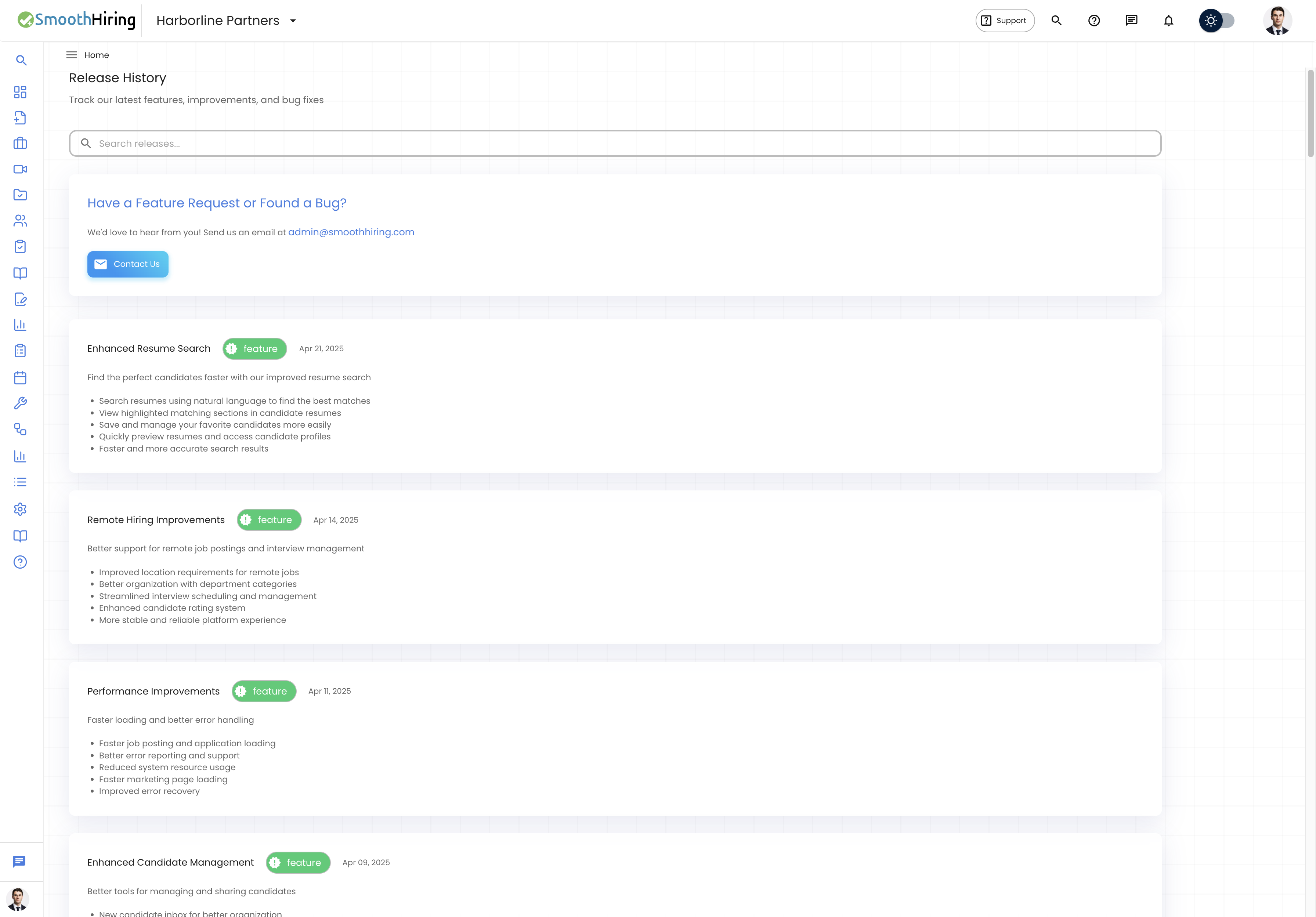
The Release Notes page provides a chronological history of all updates to SmoothHiring. Each entry describes what changed, why it matters, and what you can now do differently. This transparency helps you:
- Discover new features that can improve your hiring process.
- Understand improvements to existing features.
- Learn about bug fixes that resolved issues you may have encountered.
- Stay current with the platform's capabilities.
Accessing Release Notes
From the Sidebar Navigation
- Log in to SmoothHiring.
- Look for the "What's New" or "Releases" option in the left sidebar navigation.
- Click to open the Release History page.
Direct URL
Navigate directly to the release notes page at:
/employer/releasesUnderstanding Release Types
Each release is categorized into one of three types, indicated by a color-coded badge:
Feature (Green Badge)
New capabilities that did not exist before. Features add entirely new functionality to the platform.
Examples:
- Pipeline View for applicant review
- @mention support in comments
- Port to Job functionality
- Video assessment integration
Improvement (Blue Badge)
Enhancements to existing features. Improvements make something that already worked even better.
Examples:
- Faster applicant list loading
- Better mobile responsiveness
- Enhanced search accuracy
- Streamlined job creation wizard
Bug Fix (Red Badge)
Corrections to issues that were causing incorrect behavior. Bug fixes resolve problems users may have experienced.
Examples:
- Fixed email delivery issues
- Resolved pagination errors
- Corrected score calculation edge cases
- Fixed display issues on specific browsers
Reading a Release Note
Each release note entry on the page includes:
Title
A brief, descriptive name for the update (e.g., "Pipeline View for Applicant Review").
Type Badge
A color-coded chip indicating the type: Feature (green), Improvement (blue), or Bug Fix (red).
Date
The date the update was released, formatted as "Mon DD, YYYY" (e.g., "Jan 15, 2025").
Description
A paragraph explaining what changed and why it matters to you.
Changes List (Optional)
Some releases include a bulleted list of specific changes:
- Added new filtering options for applicant list
- Updated the resume parser for better accuracy
- Fixed an issue where email notifications were delayed
Version (Optional)
Some releases include a version number for reference.
Searching Release Notes
The Release Notes page includes a search bar at the top:
- Type a keyword or phrase into the search field.
- Results filter in real-time as you type.
- The search checks against:
- Release title
- Release description
- Release type (feature, improvement, bugfix)
- Individual changes listed in each release
- Version numbers
- Clear the search to see all releases again.
Search Tips
- Search for a feature name to find when it was released (e.g., "pipeline").
- Search for "fix" to see all bug fixes.
- Search for "improvement" to see all enhancements.
- Search by date keywords if you remember approximately when a change happened.
Submitting Feature Requests
At the top of the Release Notes page, you will find a Feature Request section:
Have a Feature Request or Found a Bug? We'd love to hear from you! Send us an email at admin@smoothhiring.com
How to Submit
- Click the Contact Us button on the Release Notes page, or
- Send an email directly to admin@smoothhiring.com.
What to Include in Your Request
For the best response, include:
- Your name and company — so we can follow up with you.
- Feature description — what you would like to see.
- Use case — why this feature would help your hiring process.
- Priority — how important this is to your workflow.
- Screenshots — if you are reporting a bug, include screenshots of the issue.
What Happens Next
Our product team reviews all feature requests and bug reports. While we cannot guarantee a timeline for every request, your feedback directly influences our development roadmap.
Staying Informed
Check Release Notes Regularly
Make it a habit to visit the Release Notes page periodically — we recommend checking at least monthly. New features could significantly improve your workflow, and you might be missing out on capabilities you did not know existed.
Share with Your Team
When you discover a new feature that could benefit your team:
- Note the feature and how it works.
- Share the information with relevant team members.
- Consider updating your team's hiring workflow to incorporate new tools.
Training on New Features
When significant new features are released:
- Read the release note and any linked documentation.
- Explore the feature in your account.
- Walk your team through the new functionality.
- Update any internal documentation or training materials.
Recent Highlights
SmoothHiring regularly releases updates across all areas of the platform. Some of the areas we have recently focused on include:
- Applicant Management — Enhanced candidate review workflows, pipeline views, and team collaboration tools.
- Assessments — Improved scoring algorithms, new assessment types, and better candidate experiences.
- Automation — Smarter email templates, auto-reject criteria, and notification systems.
- Integrations — Expanded job board connections and calendar integrations.
- User Experience — Faster page loads, mobile improvements, and interface refinements.
Visit the Release Notes page in your SmoothHiring account for the complete and current list.
Frequently Asked Questions
How often does SmoothHiring release updates? We release updates on a continuous basis — typically several times per month. Each update goes through thorough testing before deployment.
Will updates affect my current data? No. Updates are designed to be non-destructive. Your jobs, candidates, settings, and data remain intact through all updates. If an update ever requires action on your part, we will notify you in advance.
Do I need to do anything to get updates? No. SmoothHiring is a cloud-based platform, so updates are deployed automatically. You always have access to the latest version without any action required.
Can I opt out of updates? As a cloud-based service, updates are applied universally. This ensures all users benefit from the latest security patches, performance improvements, and features.
How do I report a bug? Email admin@smoothhiring.com with a description of the issue, steps to reproduce it, your browser information, and any screenshots. Our team will investigate and fix confirmed bugs.
Can I request a feature? Absolutely. Email admin@smoothhiring.com with your feature idea and use case. We value user feedback and it directly shapes our product roadmap.
Where can I see the full release history? The Release Notes page in your SmoothHiring account shows the complete history of all releases, searchable by keyword.