

Understanding Fit Score & Candidate Ranking
SmoothHiring uses a multi-dimensional scoring system to evaluate and rank candidates objectively. Understanding how scores are calculated helps you make faster, data-driven hiring decisions. This guide explains every scoring component, how rankings work, and how to use scores effectively in your workflow.
The Scoring ComponentsEach candidate receives multiple scores that together paint a complete picture:
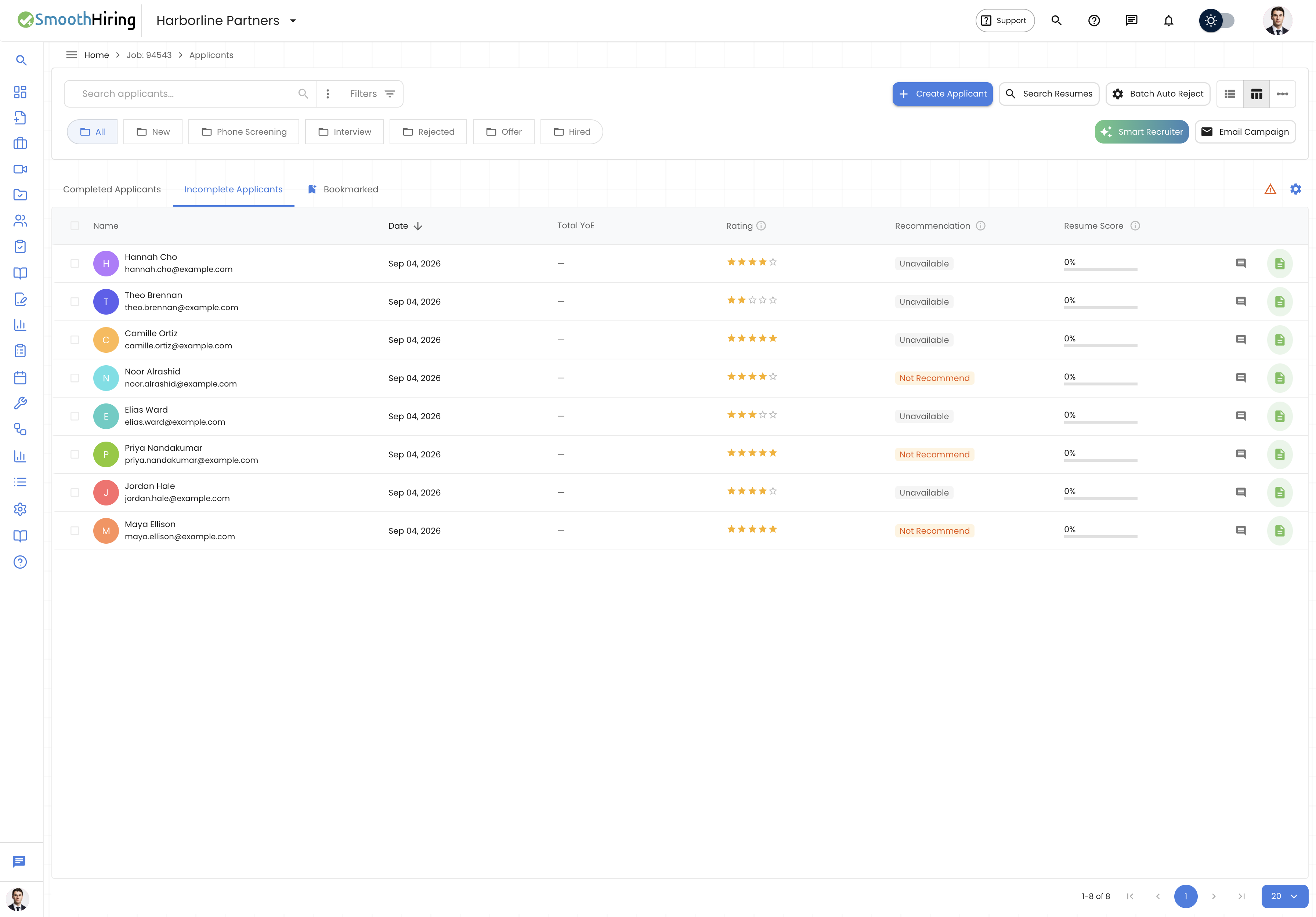
| Score | Range | Source | What It Measures |
|---|---|---|---|
| Resume Match Score | 0–100% | AI resume analysis | How closely the resume matches job requirements |
| Job Fit (Match Type) | 5 levels | Behavioral assessment | Behavioral alignment with the role profile |
| Smart Fingerprint Recommendation | 4 levels | AI multi-factor analysis | Overall candidate suitability |
| Star Rating | 1–5 | Manual recruiter input | Recruiter's subjective evaluation |
| Assessment Scores | Varies | Skill assessments | Performance on specific tests |
Resume Match Score (0–100%)
How It's Calculated
The Resume Match Score uses AI to compare the content of a candidate's resume against the job description and requirements. The algorithm evaluates:
- Skills Match – Do the candidate's listed skills align with required and preferred skills?
- Experience Relevance – Are their past roles and responsibilities relevant to this position?
- Education Alignment – Does their educational background meet the job's requirements?
- Keyword Density – How frequently do job-relevant terms appear in the resume?
- Seniority Alignment – Does their career level match what the role demands?
Score Ranges
| Range | Interpretation | Typical Action |
|---|---|---|
| 80–100% | Excellent match | Priority review, fast-track |
| 60–79% | Good match | Standard review |
| 40–59% | Moderate match | Review if pipeline is thin |
| 20–39% | Weak match | Consider for related roles |
| 0–19% | Poor match | Likely auto-reject candidate |
Visual Display
The Resume Score appears as a circular gauge (donut chart) in the applicant list. The gauge fills proportionally and uses color coding:
- Green (high scores) – 80%+
- Amber (moderate scores) – 50–79%
- Red (low scores) – Below 50%
Job Fit (Match Type)
The Five Fit Levels
| Level | Internal Value | Meaning |
|---|---|---|
| Strong Fit | strong |
Behavioral profile very closely matches the ideal for this role |
| Good Fit | match, good |
Solid behavioral alignment with minor variations from ideal |
| Fair Fit | fair |
Mixed alignment; some traits match well, others diverge |
| Weak Fit | none, weak |
Significant behavioral mismatch with the role's requirements |
| Distortion | distortion |
Response patterns suggest inconsistency; interpret with caution |
How Job Fit Is Determined
- A Job Profile defines the ideal behavioral characteristics for the role across multiple dimensions
- The candidate completes a behavioral assessment
- Each dimension is scored and compared to the target
- The overall fit level is calculated based on:
- Number of dimensions that meet or exceed the target
- Severity of any gaps
- Overall pattern consistency (distortion detection)
Visual Indicators
In the applicant list, Job Fit appears as a colored chip:
- Each fit level has a distinct icon for accessibility
- Chips show the fit label text (e.g., "Strong Fit", "Good Fit")
- The chip uses outlined style for a clean appearance
Smart Fingerprint Recommendation
How It Works
The Smart Fingerprint system is an AI layer that analyzes all available data for a candidate and produces a holistic recommendation. It considers:
- Resume match score
- Behavioral assessment results (Job Fit)
- Assessment performance
- Skills alignment
- Experience relevance
- Any red flags or exceptional strengths
Recommendation Levels
| Recommendation | Color Swatch | Meaning |
|---|---|---|
| Highly Recommended | Green | Strong signals across all dimensions; prioritize |
| Recommended | Blue/Teal | Good overall candidate; proceed with confidence |
| Consider | Amber | Mixed signals; investigate specific areas in interview |
| Not Recommended | Red/Grey | Significant concerns; likely not suitable |
Reasoning
Each recommendation includes reasoning bullets explaining why the system arrived at its conclusion. Hover over the recommendation in the list view to see reasoning such as:
- "Strong alignment between skills and job requirements"
- "Below-target scores on key behavioral dimensions"
- "Limited relevant experience for seniority level"
Star Rating (1–5)
Purpose
The star rating is a manual score assigned by recruiters or hiring managers to capture subjective evaluation that automated scoring can't measure—like interview performance, cultural impression, or gut feeling.
How to Set
- In the list view: Click the star widget on any applicant row
- In the profile view: Click the star widget in the professional summary section
- Ratings save automatically
Using Ratings for Filtering
Filter by rating in Advanced Filters using numeric filters:
- Show only 4+ star candidates
- Exclude unrated candidates
- Sort by rating to surface top-rated candidates first
Assessment Scores
Per-Assessment Scoring
Each assessment produces its own score. Depending on the assessment type:
| Assessment Category | Score Type |
|---|---|
| Cognitive/Aptitude | Percentage correct + percentile rank |
| Skills tests | Score + pass/fail threshold |
| Personality | Dimensional scores (no single number) |
| Cultural fit | Alignment percentage |
| Simulations | Task-completion metrics + accuracy |
Cohort Standing
Some assessments include cohort standing which shows how a candidate performed relative to others who took the same assessment. This provides valuable context—a 75% score means different things if the average is 50% vs. 90%.
AI-Powered Analysis (Smart Recruiter)
How AI Analysis Scores Work
When you run a Smart Recruiter analysis, the AI scores each candidate on a 0–100 scale against your custom prompt. Results show:
- Match Score – How well the candidate matches your described criteria
- Match Strength – Categorized as Strong, Moderate, or Weak
- Reasoning – Bullet points explaining the match
- Key Skills – Highlighted skills relevant to your query
- Concerns – Any potential issues or gaps identified
Score Colors in AI Results
| Score | Color | Category |
|---|---|---|
| 80+ | Green (#27ae60) | Strong match |
| 50–79 | Amber (#f39c12) | Moderate match |
| Below 50 | Red (#e74c3c) | Weak match |
Ranking Candidates
Default Sort Order
By default, applicants are sorted by application date (newest first). However, you can leverage scores for ranking:
Sorting Options
| Sort Field | How to Access | Best For |
|---|---|---|
| Date | Click "Date" column header | Reviewing in chronological order |
| Name | Click "Name" column header | Finding a specific person |
| Resume Score | Available in table view | Identifying highest-scoring resumes |
| Rating | Available in table view | Surfacing recruiter favorites |
Using Filters to Rank
Combine filters for a powerful ranking workflow:
- Filter by Fit: Show only "Strong Fit" and "Good Fit" candidates
- Sort by Resume Score: Highest scores first
- Review top results: These are your best candidates based on both behavioral fit and resume match
Stage-Based Ranking
Use stage folders to create ranking contexts:
- New stage sorted by Resume Score → Prioritize which new applicants to review first
- Interview stage sorted by Rating → See how candidates ranked after interviews
- All stages filtered by Strong Fit → Find your best candidates regardless of where they are in the process
Using Scores in Batch Auto Reject
Scores directly power the Batch Auto Reject feature:
- Set a Resume Score Threshold – Candidates below this score are flagged
- Select Fit Levels to reject – Target Weak Fit and Distortion candidates
- Combine with YOE ranges – Further narrow by experience level
Interpreting Score Combinations
| Resume Score | Job Fit | Recommendation | Interpretation |
|---|---|---|---|
| High (80%+) | Strong | Highly Recommended | Top candidate – prioritize |
| High (80%+) | Weak | Consider | Good on paper but behavioral mismatch – investigate |
| Low (<40%) | Strong | Consider | Behavioral fit is good but resume doesn't match – may be a career changer |
| Low (<40%) | Weak | Not Recommended | Poor match on all dimensions |
| Moderate | Fair | Consider | Average candidate – depends on pipeline depth |
Tip: Never rely on a single score. The power of SmoothHiring is the combination of multiple scoring dimensions giving you a complete picture.
Related Pages
- Managing Candidates – Viewing and sorting candidates by score
- Candidate Screening – How screening feeds into scoring
- Batch Auto Reject – Using scores for automated decisions
- Smart Resume Search – Finding specific qualifications beyond scores