

Screening Candidates in SmoothHiring
SmoothHiring's candidate screening system uses a multi-layered approach combining AI-powered resume analysis, behavioral assessments, predictive surveys, and custom screening questions to evaluate every applicant objectively. This guide explains how screening works, how to configure it, and how to interpret results.
How Screening Works
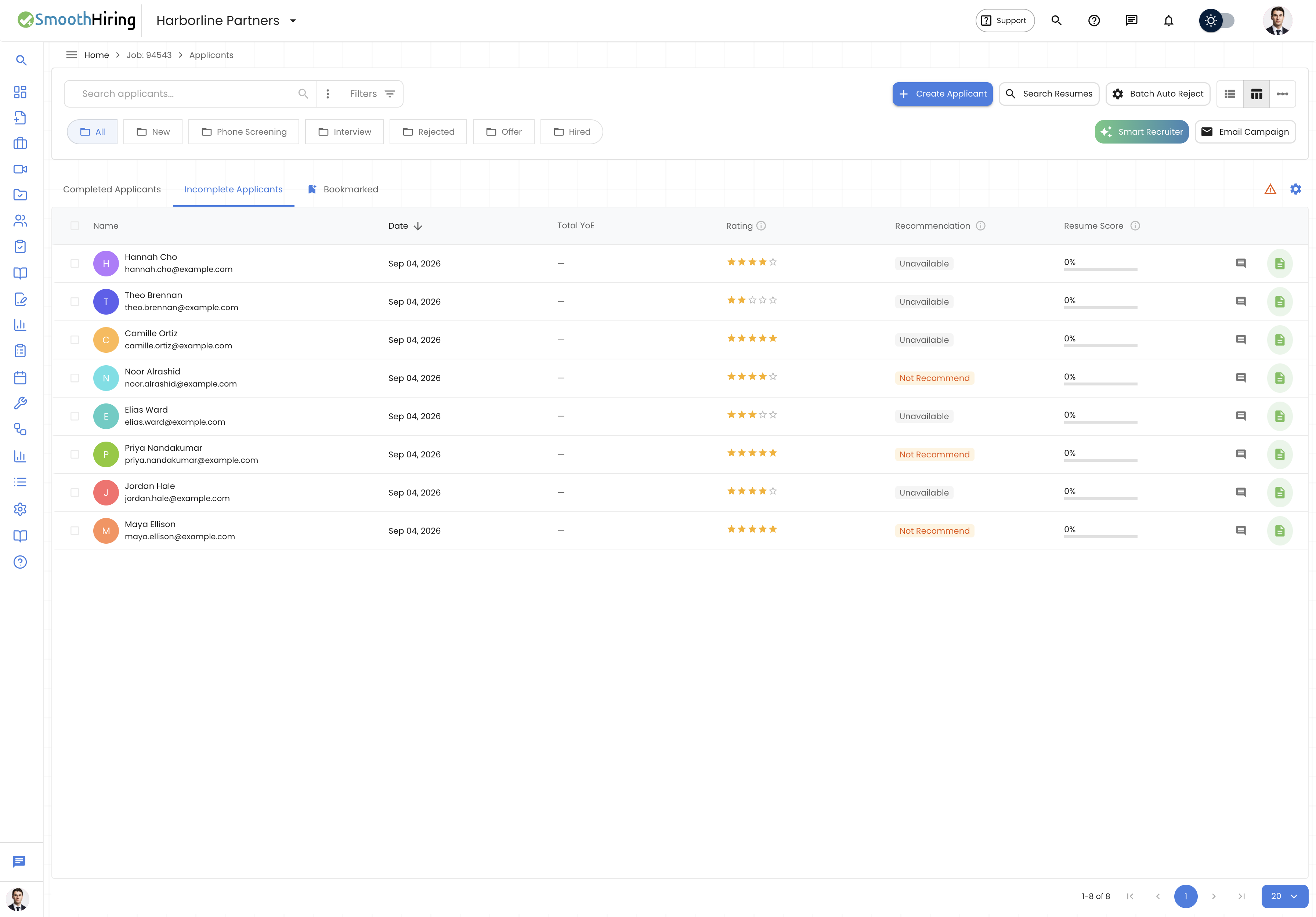
When a candidate applies to a job, they go through several screening layers:
- Resume Analysis – AI extracts skills, experience, and qualifications from the uploaded resume and scores it against job requirements
- Behavioral Assessment – Personality and work-style evaluation based on the SmoothHiring JobFingerprint™
- Custom Screening Questions – Additional questions configured per job to assess specific criteria
- Smart Fingerprint Analysis – AI-driven recommendation combining all data points
Each layer contributes to the candidate's overall Fit Score and recommendation.
Resume Screening
How Resume Scoring Works
When a resume is uploaded (either by the candidate or manually by a recruiter), the system:
- Parses the resume to extract structured data (contact info, work history, education, skills, certifications, awards)
- Matches extracted data against the job description requirements
- Calculates a Resume Match Score (0–100%) indicating how closely the resume aligns with the job
The resume score appears as a circular gauge on each applicant card in the list view.
What's Evaluated
| Category | What's Analyzed |
|---|---|
| Skills | Technical and soft skills matched against job requirements |
| Experience | Years of experience, relevance of past roles, industry alignment |
| Education | Degree level, field of study, certifications |
| Keywords | Industry-specific terms and required qualifications |
| Job Title | Current and previous job title relevance |
Behavioral Assessment (JobFingerprint™)
The JobFingerprint™ is SmoothHiring's proprietary behavioral assessment that evaluates candidates on personality traits relevant to the role.
How It Works
- A Job Profile is created for the role defining ideal behavioral characteristics
- Candidates complete a behavioral assessment as part of their application
- The system compares candidate results against the job profile
- A Job Fit category is assigned based on the match
Job Fit Categories
| Fit Level | Description |
|---|---|
| Strong Fit | Candidate's behavioral profile closely matches the job requirements. Highest alignment. |
| Good Fit | Solid alignment with the role profile. Minor areas that differ from the ideal. |
| Fair Fit | Moderate alignment. Some behavioral traits match well, others diverge from the ideal. |
| Weak Fit | Low alignment between the candidate's profile and the role requirements. |
| Distortion | Assessment responses indicate inconsistency or social desirability bias. Results should be interpreted with caution. |
| Unavailable | Assessment not yet completed or not applicable. |
Viewing the Fingerprint
On the applicant profile under Job Fit Details, you'll see:
- A visual fingerprint chart showing how the candidate scores against target areas
- Areas where the candidate meets expectations (green)
- Areas where the candidate exceeds expectations (blue)
- Watch-out areas where scores are below the target (red/orange)
Tip: Interview questions are automatically generated for watch-out areas to help you probe deeper in conversations.
Smart Fingerprint Recommendation
The Smart Fingerprint system provides an AI-powered recommendation for each candidate based on all available data:
Recommendation Categories
- Highly Recommended – Strong signals across resume, behavior, and assessments
- Recommended – Good overall match with minor areas to explore
- Consider – Mixed signals; worth reviewing but investigate specific areas
- Not Recommended – Significant gaps or concerns identified
Each recommendation includes reasoning – hover over the recommendation chip in the list view to see bullet-point explanations of why the system made that assessment.
Custom Screening Questions
Adding Questions to a Job
When creating or editing a job posting, you can add custom screening questions. These appear during the candidate's application process.
Question Types
| Type | Use Case |
|---|---|
| Text / Short Answer | Open-ended responses (e.g., "Describe your experience with...") |
| Multiple Choice | Select from predefined options |
| Yes/No | Binary qualification checks |
| Numeric | Number-based answers (e.g., "Years of experience with...") |
| Date | Date-based responses |
Knockout / Disqualifying Questions
Some questions can be configured as knockout questions. If a candidate's response doesn't meet the threshold:
- They may be automatically marked as Not Qualified
- They can be flagged for manual review
Viewing Responses
On the applicant profile, click the Additional Questions tab to see all screening question responses. Responses are also available as advanced filter criteria, allowing you to filter candidates by specific answers.
Assessment-Based Screening
SmoothHiring offers a library of pre-built assessments that can be attached to job postings or sent to candidates at specific pipeline stages.
Assessment Types
- Cognitive Ability – Problem-solving, logical reasoning, numerical reasoning
- Skills Tests – Technical assessments (Excel, data entry, typing, coding)
- Personality – DISC workstyle, cultural fit, integrity
- Industry-Specific – Healthcare professionalism, hospitality, sales aptitude, and more
How Assessments Are Triggered
Assessments can be triggered in two ways:
- During Application – Required as part of the application process
- Stage Action – Automatically sent when a candidate is moved to a specific pipeline stage (configured in Custom Hiring Pipeline)
Assessment Results
Results appear on the candidate's profile under the Assessments tab, showing:
- Overall score and percentile
- Section-by-section breakdown
- Time taken and completion status
- Integrity signals (if applicable)
- Cohort standing compared to other candidates
Culture Fit Evaluation
The Culture Fit assessment evaluates how well a candidate's values and work preferences align with your organization.
What's Measured
- Work environment preferences
- Communication style
- Decision-making approach
- Team collaboration tendencies
- Values alignment
Results are displayed visually in the candidate profile with a detailed breakdown.
Predictive Survey
The Predictive Survey provides additional behavioral data points:
- Summary scores across key dimensions
- Comparison against the role's ideal profile
- Cohort standing showing how the candidate compares to others who've taken the same assessment
Screening in Practice: A Typical Workflow1. Candidate applies → Resume is parsed and scored automatically
- Candidate completes behavioral assessment → Job Fit is calculated
- Candidate answers screening questions → Knockout criteria are checked
- Smart Fingerprint analyzes all data → Recommendation is generated
- Recruiter reviews the applicant list sorted by fit/score → Takes action
Using AI-Powered Smart Recruiter for Screening
For advanced screening, use the Smart Recruiter feature:
- Click the Smart Recruiter button (gradient sparkle icon) in the applicants toolbar
- Describe the type of candidate you're looking for in natural language (e.g., "Strong React and Node.js experience, 3+ years at tech companies")
- Optionally enable email notification when analysis completes
- Click Start Analysis
The AI will analyze up to 500 candidates in batches of 50 and rank them against your criteria. When complete, an "Analysis Ready!" button appears in the toolbar. See Fit Score & Ranking for details on interpreting results.
Note: You can run up to 5 analyses per job. Each analysis remains accessible from the results page.
Related Pages
- Managing Candidates – Navigate and manage your applicant list
- Fit Score & Ranking – Deep dive into scoring algorithms
- Custom Hiring Pipeline – Configure assessment triggers at stage transitions
- Batch Auto Reject – Automatically reject candidates below screening thresholds