

Configuring Job Board Settings
The Job Boards page provides a comprehensive directory of all job boards where your positions are distributed when you post a job through SmoothHiring. With automatic distribution across 50+ platforms, SmoothHiring maximizes the visibility of your job postings to attract the widest pool of qualified candidates.
Navigating to Job Boards
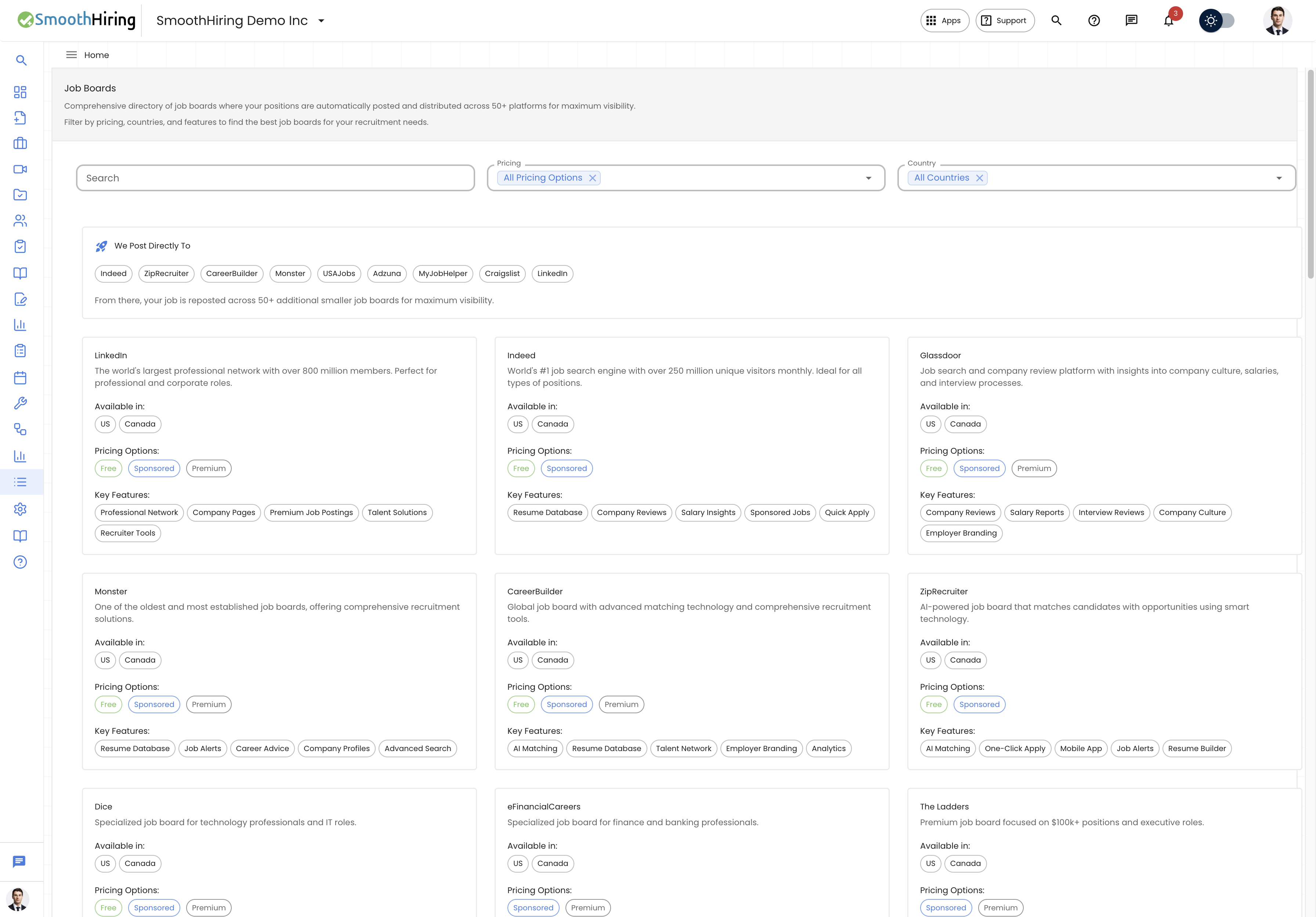
- Direct URL:
/employer/job-boards - Navigation: Click Job Boards in the left sidebar under the Insights section.
How Job Distribution Works
When you post a job through SmoothHiring:
- Direct Posting — Your job is posted directly to major job boards (Indeed, LinkedIn, Glassdoor, ZipRecruiter, Google for Jobs, etc.).
- Redistribution — From those direct postings, your job is automatically reposted across 50+ additional smaller and niche job boards.
- Aggregation — Job aggregator sites pick up your listings and display them to their audiences.
This means a single job posting in SmoothHiring can reach candidates across dozens of platforms without any extra effort on your part.
Direct Posting Boards
SmoothHiring posts directly to these major platforms:
These are the primary job boards that receive your listings first. From there, the job cascades to additional platforms through aggregation partnerships.
Tip: Direct posting boards typically have the highest visibility and candidate volume. Your job will appear on these within 24-48 hours of posting.
Browsing the Job Board Directory
The Job Boards page includes a searchable, filterable directory of all boards in the SmoothHiring network.
Search and Filter
| Filter | Description |
|---|---|
| Search | Type a keyword to search by board name, description, or features |
| Pricing | Filter by Free, Sponsored, or Premium boards |
| Country | Filter by the countries/regions a board operates in |
Job Board Information
Each board card displays:
| Field | Description |
|---|---|
| Name | The job board's name |
| Description | What the board specializes in |
| Countries | Which countries/regions the board covers |
| Pricing Options | Whether listing is Free, Sponsored (pay-per-click), or Premium (paid placement) |
| Key Features | What makes the board unique (e.g., industry focus, candidate quality, reach) |
Pricing Models
Job boards in the network use different pricing structures:
| Model | Description | Cost to You |
|---|---|---|
| Free | Your job is listed at no additional cost | Included in your SmoothHiring subscription |
| Sponsored | Pay-per-click or boosted visibility options | Additional cost; higher visibility |
| Premium | Featured placement or dedicated board access | Additional cost; premium positioning |
Note: Free distribution is included with all SmoothHiring plans. Sponsored and Premium options are available for employers who want additional reach for specific positions.
Geographic Coverage
Job boards in the network cover multiple regions:
- North America — United States, Canada
- Europe — United Kingdom, Germany, France, and more
- Asia-Pacific — Australia, India, Singapore, and more
- Global — Boards with worldwide reach
Use the Country filter to find boards that operate in your target hiring regions.
Understanding Source Tracking
When candidates apply to your jobs, SmoothHiring tracks which job board or source they came from. This data feeds into your Analytics under the Sourcing tab, specifically:
Source Breakdown
The Analytics Source Breakdown chart shows a pie chart of where your candidates are finding your jobs:
- Which job boards generate the most applications
- The percentage of candidates from each source
- Trends in source effectiveness over time
How Source Is Tracked
| Source Type | How It's Captured |
|---|---|
| Job Board | Tracked via the referral link when candidates click through |
| Careers Page | Candidates who apply directly from your careers page |
| Direct Link | Candidates who use a direct application URL |
| Referral | Candidates referred by existing employees (if configured) |
Maximizing Job Board Effectiveness
Writing Board-Friendly Job Descriptions
Different job boards have different formatting preferences. To maximize visibility:
- Use clear, searchable job titles — Avoid internal jargon. "Software Engineer" performs better than "Code Ninja Level 3."
- Include location — Many boards use location for search results and recommendations.
- List salary range — Boards like Indeed and Glassdoor prioritize listings with salary information.
- Use keywords — Include industry-standard terms that candidates search for.
- Keep it structured — Use headers, bullet points, and clear sections.
Timing Your Posts
- Best days to post: Tuesday through Thursday typically see the highest application rates.
- Morning posts: Jobs posted in the morning often get indexed faster by job boards.
- Avoid weekends/holidays: Application volume drops significantly on weekends.
Monitoring Performance
Use the My Analytics page to:
- Check which boards are generating the most applications (Source Breakdown).
- Compare application volume across different jobs (Applications by Job).
- Track daily application patterns (Applications by Day).
- Identify which sources produce the highest-quality candidates (Match Type by source).
Sponsored Job Options
For roles that need extra visibility, consider sponsored options:
| Feature | Description |
|---|---|
| Boosted visibility | Your job appears higher in search results |
| Featured placement | Your job is highlighted or pinned on the board |
| Extended reach | Distribution to additional niche boards |
| Performance tracking | Additional analytics on sponsored performance |
Contact your Hiring Coach for recommendations on when sponsoring is worth the investment.
Frequently Asked Questions
Q: How long does it take for my job to appear on job boards? A: Direct posting boards typically show your job within 24-48 hours. Aggregator sites may take 3-5 business days.
Q: Can I choose which boards my job appears on? A: SmoothHiring distributes to all available free boards automatically. You can add sponsored options for specific boards.
Q: Why don't I see my job on a specific board? A: Some boards have editorial review processes. If your job meets their guidelines, it will appear after review. Some niche boards only display certain job categories.
Q: Do I need to create accounts on each job board? A: No. SmoothHiring handles all the distribution for you. You only need one account — your SmoothHiring account.
Q: Can I remove my job from a specific board? A: When you close or expire a job in SmoothHiring, it is automatically removed from all boards within 24-48 hours.
Q: How do I know which board a candidate came from? A: Check the candidate's profile — the application source is tracked and displayed. You can also view aggregate source data in Analytics.
Tips
Tip: Don't edit your job title after posting unless necessary — some boards treat title changes as a new listing and may delay re-indexing.
Tip: Use the Country filter to understand which boards cover your target market. If you're hiring internationally, ensure boards in those regions are included.
Tip: Monitor your Analytics Source Breakdown weekly to understand which boards deliver the most value for your roles.
Tip: Ask your Hiring Coach about sponsored options if a critical role isn't receiving enough applications after 1-2 weeks.
Related Pages
- My Analytics — Track source performance and application trends
- Hiring Coach — Get advice on job posting strategy
- Dashboard — Quick overview of active jobs and applications
- Company Details — Ensure your company info is correct for job board listings