

EEO & EEOC Compliance in SmoothHiring
SmoothHiring provides built-in support for Equal Employment Opportunity (EEO) compliance, helping employers collect voluntary demographic data from applicants during the hiring process. This guide explains what EEO/EEOC is, how to configure EEO questionnaires in SmoothHiring, and how candidate data is handled in accordance with federal guidelines.
What is EEO/EEOC?
The Equal Employment Opportunity Commission (EEOC) is the federal agency responsible for enforcing laws that make it illegal to discriminate against job applicants or employees based on race, color, religion, sex, national origin, age, disability, or genetic information.
Why EEO Data Collection Matters
Employers with 15 or more employees are required to comply with federal anti-discrimination laws. Many employers—especially those with 100+ employees or federal contractors—are required to file annual EEO-1 reports with the EEOC, which summarize workforce demographics.
Even if your organization is not legally required to file EEO-1 reports, collecting voluntary demographic data demonstrates a commitment to:
- Diversity and inclusion — Tracking demographic data helps you measure and improve diversity in your hiring pipeline.
- Compliance readiness — Having data on hand prepares you for any government audits or inquiries.
- Bias identification — Analyzing demographic trends across your hiring funnel can reveal unintentional biases.
- Grant and contract eligibility — Many government contracts and grants require EEO data collection.
Key Principles
- EEO questionnaire responses are always voluntary — candidates can choose "I do not wish to answer" for any question.
- EEO data must be kept confidential and separate from hiring decisions.
- EEO information should never be used to make employment decisions.
- Responses are collected for statistical reporting purposes only.
Enabling or Disabling EEO on Your Account
SmoothHiring allows you to enable or disable EEO data collection at the account level. This setting controls whether the EEO questionnaire appears during the job creation process.
To Enable/Disable EEO:
Method 1: From Account Settings
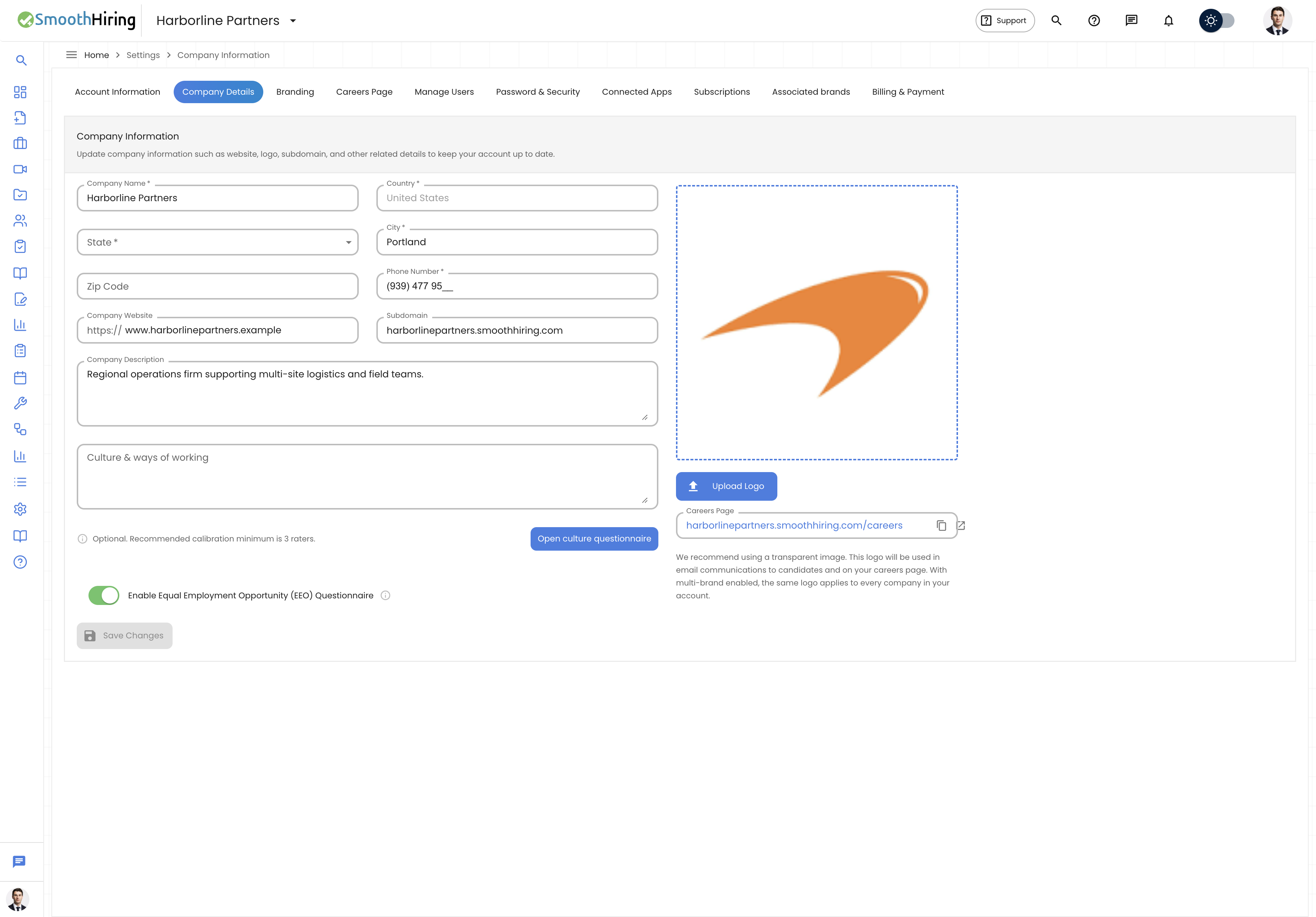
- Navigate to Settings from the main sidebar.
- Go to Company Info.
- Look for the EEO Questionnaire toggle.
- Toggle it on to enable EEO data collection, or off to disable it.
- Click Save to apply the change.
Method 2: During Job Creation
- When creating or editing a job, navigate to the EEO step in the job creation wizard.
- At the top of the page, you'll see a toggle labeled "Remove EEO Questionnaire for all jobs".
- Toggle this switch to enable or disable EEO collection across all jobs.
- This change is saved at the account level and applies to all future jobs.
When EEO is disabled, the EEO questionnaire step is skipped entirely during job creation, and applicants will not see any EEO questions when applying.
Adding EEO Questions to Jobs
When EEO is enabled on your account, each new job you create includes an EEO configuration step. Here you select which demographic questions to include in the application.
Navigating to EEO Configuration
During the job creation workflow, the EEO step appears after the Additional Questions step:
- Job Details → 2. Additional Questions → 3. EEO Questionnaire → 4. Job Bundles
Selecting Questions
The EEO configuration page displays a table with all available EEO questions. For each question, you can:
- Toggle on/off — Use the switch next to each question to include or exclude it from the application.
- Select All — Use the toggle in the table header to include all questions at once.
- Preview answers — When a question is toggled on, its answer options are displayed so you can see exactly what candidates will see.
Available EEO Questions
SmoothHiring includes a comprehensive library of 23 EEO-compliant questions across several categories:
Demographic Questions
| Question | Answer Type | Options |
|---|---|---|
| What is your gender? | Radio buttons | Male, Female, Non-Binary, I do not wish to answer |
| What is your race/ethnicity? | Dropdown | Hispanic or Latino, White, Black or African American, Asian, Native American or Alaska Native, Native Hawaiian or Other Pacific Islander, Two or more races, I do not wish to answer |
| What is your age group? | Dropdown | Under 18, 18-24, 25-34, 35-44, 45-54, 55-64, 65 or older, I do not wish to answer |
| What is your sexual orientation? | Radio buttons | Straight or Heterosexual, Gay or Lesbian, Bisexual, I do not wish to answer |
| What is your marital status? | Dropdown | Single, Married, Divorced, Widowed, Domestic Partnership, I do not wish to answer |
Disability & Accommodation
| Question | Answer Type |
|---|---|
| Do you identify as disabled? | Radio (Yes/No/Decline) |
| Do you require accommodations due to a disability? | Radio (Yes/No/Decline) |
| What is your disability status? | Radio (I have a disability / I do not / Decline) |
| Have you ever been diagnosed with a mental health condition? | Radio (Yes/No/Decline) |
Veteran & Citizenship Status
| Question | Answer Type |
|---|---|
| Are you a U.S. citizen? | Radio (Yes/No/Decline) |
| Veteran status | Radio (I am a veteran / I am not / Decline) |
| Do you identify as a transgender person? | Radio (Yes/No/Decline) |
Employment & Education
| Question | Answer Type |
|---|---|
| Are you currently employed? | Radio (Yes/No/Decline) |
| What is your highest level of education completed? | Dropdown (Some High School through Doctoral Degree) |
| What is your primary language? | Dropdown (English, Spanish, Chinese, Arabic, French, Hindi, Other, Decline) |
| What is your primary employment status? | Dropdown (Full-Time, Part-Time, Temporary, Contract, Self-Employed, Unemployed, Decline) |
| What is your employment type? | Dropdown (Employee, Independent Contractor, Freelancer, Intern, Apprentice, Decline) |
Additional Questions
| Question | Answer Type |
|---|---|
| Are you currently pregnant or expecting a child? | Radio (Yes/No/Decline) |
| Are you a member of a labor union? | Radio (Yes/No/Decline) |
| Are you a participant in a government assistance program? | Radio (Yes/No/Decline) |
| Do you have access to reliable transportation to work? | Radio (Yes/No/Decline) |
| Do you speak any languages other than English? | Radio (Yes/No/Decline) |
| Have you ever been convicted of a felony? | Radio (Yes/No/Decline) |
| Please provide additional comments | Free text |
Previewing the Questionnaire
Before finalizing, you can preview exactly how the EEO questionnaire will appear to applicants:
- Select the questions you want to include.
- Click Next to open the preview dialog.
- The preview shows each selected question with its answer format (radio buttons, dropdowns, or text fields).
- Click Confirm to save and proceed, or close the dialog to make changes.
Skipping EEO
If you don't want to include EEO questions for a particular job, click the Skip button at the top of the EEO configuration page. The job will be created without any EEO questionnaire.
How Candidate EEO Data is Collected
When a candidate applies to a job that has EEO questions enabled, they will see the EEO questionnaire as part of the application process. Here's what happens:
- Voluntary participation — The questionnaire is clearly labeled as optional. Each question includes an "I do not wish to answer" option.
- Data submission — When the candidate submits their application, their EEO responses are saved separately from their application materials.
- Data association — Responses are linked to the candidate's job application record for reporting purposes.
What Candidates See
Candidates encounter the EEO questionnaire during the application process with a clear explanation:
"This questionnaire gathers optional demographic details about gender, ethnicity, and disability status, which are used for diversity tracking and fostering an inclusive workplace."
The questionnaire format varies by question type:
- Radio button questions — Candidates select one option from a list.
- Dropdown questions — Candidates choose from a dropdown menu.
- Text questions — Candidates can type a free-form response.
Data Privacy and Compliance
Separation of Data
EEO response data is handled with strict privacy controls:
- EEO responses are stored separately from the candidate's qualifications, resume, and assessment results.
- Hiring managers reviewing applicant profiles do not see EEO responses as part of the standard evaluation workflow.
- EEO data is used exclusively for aggregate reporting and compliance purposes.
Confidentiality Requirements
As an employer using SmoothHiring's EEO features, you should ensure:
- Only authorized HR personnel or compliance officers access EEO data.
- EEO data is never shared with hiring managers making individual employment decisions.
- Data is retained according to your organization's data retention policies and applicable regulations (EEOC recommends retaining records for at least one year after the date of a hiring decision, or two years for federal contractors).
Federal Guidelines
SmoothHiring's EEO questionnaire is designed to align with federal guidelines including:
- Title VII of the Civil Rights Act of 1964 — Prohibits discrimination based on race, color, religion, sex, or national origin.
- Age Discrimination in Employment Act (ADEA) — Protects individuals 40 and older.
- Americans with Disabilities Act (ADA) — Prohibits discrimination based on disability.
- Genetic Information Nondiscrimination Act (GINA) — Prohibits discrimination based on genetic information.
Reporting and Analysis
EEO data collected through SmoothHiring can be used for:
- EEO-1 Report preparation — Aggregate demographic data by job category for annual filings.
- Adverse impact analysis — Compare selection rates across demographic groups to identify potential disparate impact.
- Diversity metrics — Track the diversity of your applicant pool and hiring outcomes over time.
- Affirmative action planning — Support affirmative action programs with workforce demographic data.
Best Practices
- Be consistent — Use the same EEO questions across all job postings for comparable data.
- Communicate the purpose — Ensure applicants understand that responses are voluntary and used for compliance only.
- Train your team — Educate hiring managers that EEO data should never influence hiring decisions.
- Review regularly — Periodically review your EEO data to identify trends and areas for improvement.
- Stay current — EEO regulations evolve; consult with legal counsel to ensure your practices remain compliant.
- Use Select All carefully — Consider whether all 23 questions are relevant for your organization. Including too many questions may discourage candidates from completing applications.
Frequently Asked Questions
Q: Is the EEO questionnaire required by law? A: The questionnaire is optional in SmoothHiring. However, employers with 100+ employees or federal contractors with 50+ employees and contracts of $50,000+ are generally required to collect EEO data and file annual reports.
Q: Can candidates see other candidates' EEO responses? A: No. EEO responses are confidential and visible only to authorized administrators on the employer side.
Q: Can I customize the EEO questions? A: SmoothHiring provides a standard library of 23 questions. You can choose which questions to include or exclude per job, but you cannot modify the question text or answer options to ensure compliance.
Q: What happens to EEO data if I disable the feature? A: Previously collected EEO data is retained. Disabling EEO only prevents the questionnaire from appearing on future job applications.
Q: Can I add EEO questions to a job after it's been published? A: You can edit the EEO configuration of a job, but changes will only apply to future applicants. Existing applicants will not be asked to complete the questionnaire retroactively.