

Managing Your Subscription & Plan
SmoothHiring offers flexible subscription plans designed to grow with your hiring needs. From startups making their first hire to enterprises scaling rapidly, there's a plan that fits your team size, volume, and feature requirements.
Accessing Subscriptions
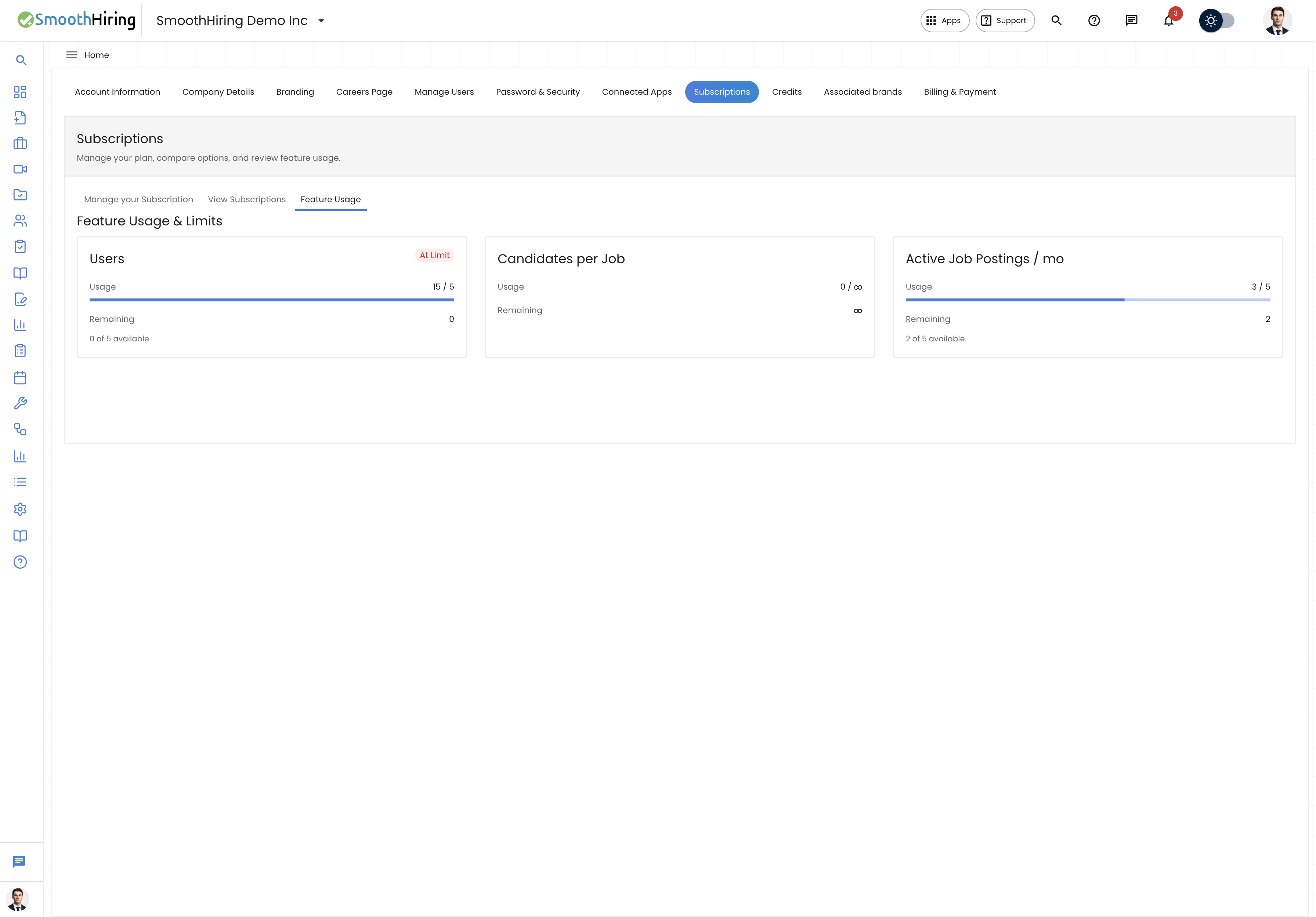
- Navigate to Settings in the left sidebar.
- Click Account Settings.
- Select the Subscriptions tab.
The Subscriptions section has multiple views:
| View | Purpose |
|---|---|
| Manage Subscription | View your current plan, features, and renewal details |
| View Subscriptions | Browse and compare all available plans |
| Subscription Dashboard | Monitor feature usage and get upgrade recommendations |
Subscription Plans
SmoothHiring offers three main subscription tiers:
Starter Plan
$149/month or $1,430/year (save ~20% with annual billing)
Enhanced hiring tools to get off the ground.
| Feature | Limit |
|---|---|
| Active Job Postings | 5 per month |
| Team Members (Users) | 5 |
| Candidates per Job | Unlimited |
| Careers Page | ✓ |
| Interview Scorecards | ✓ |
| Self-Scheduling Interviews | ✓ |
| Knockout Questions / Auto-Rejection | ✓ |
| Resume Search | ✓ |
| Email Templates | ✓ |
| Support | Standard |
Growth Plan
$229/month or $2,198/year (save ~20% with annual billing)
Hire better together with a growing team.
| Feature | Limit |
|---|---|
| Active Job Postings | 10 per month |
| Team Members (Users) | Unlimited |
| Candidates per Job | Unlimited |
| Everything in Starter | ✓ |
| AI-Powered Filtering & Recommendations | ✓ |
| Basic Candidate Benchmarks (Predictive Analytics) | ✓ |
| Automated Stage Triggers | ✓ |
| Candidate Fit Score / Ranking | ✓ |
| Candidate Recommendations | ✓ |
| Custom Hiring Pipelines | ✓ |
| Candidate Questionnaires | ✓ |
| Email Campaigns (Candidate Nurture) | ✓ |
| Support | Priority |
Scale Plan
$469/month or $4,502/year (save ~20% with annual billing)
Ultimate hiring control & flexibility.
| Feature | Limit |
|---|---|
| Active Job Postings | Unlimited |
| Team Members (Users) | Unlimited |
| Candidates per Job | Unlimited |
| Everything in Growth | ✓ |
| One-Way Video Assessments | ✓ |
| Advanced Candidate Benchmarks (Predictive Analytics) | ✓ |
| Custom Hiring Pipeline | ✓ |
| Text Messages | ✓ |
| Multi-Format | ✓ |
| SmoothHiring Assessment Support | ✓ |
| Job Advertising Budgets | ✓ |
| Applicant Inbox | ✓ |
| Support | Dedicated Success Manager |
Note: All plans include a free trial to get started. No credit card is required to begin.
Monthly vs. Yearly Billing
SmoothHiring offers both monthly and yearly billing options:
| Monthly | Yearly | |
|---|---|---|
| Billing frequency | Charged each month | Charged once per year |
| Savings | — | ~20% discount |
| Commitment | Cancel anytime | Annual commitment |
| Best for | Testing the platform, short-term needs | Long-term hiring, budget predictability |
Switching Billing Frequency
To switch between monthly and yearly:
- Go to Settings → Account → Subscriptions → View Subscriptions.
- Toggle between Monthly and Yearly using the switch at the top.
- Compare prices for each billing option.
- Select your preferred plan and billing frequency.
Subscribing to a Plan
New Subscription
- Go to Settings → Account → Subscriptions.
- Click View Subscriptions (or Browse Plans).
- Review the three plans and their features.
- Toggle between Monthly and Yearly billing.
- Click Choose Monthly Plan or Choose Yearly Plan on your desired tier.
- You'll be redirected to a secure Stripe checkout page.
- Enter your payment details.
- Complete the purchase.
- Your subscription is activated immediately.
Upgrading Your Plan
To upgrade to a higher-tier plan:
- Go to Settings → Account → Subscriptions → Manage Subscription.
- Click Upgrade Subscription.
- Select your new plan.
- The price difference is prorated for the remaining billing period.
- Complete the checkout process.
Downgrading Your Plan
To move to a lower-tier plan:
- Go to Settings → Account → Subscriptions → Manage Subscription.
- Click Upgrade Subscription (this shows all available plans).
- Select the lower-tier plan.
- The downgrade takes effect at the start of your next billing cycle.
- You retain access to higher-tier features until the current period ends.
Managing Your Subscription
Viewing Your Current Plan
- Go to Settings → Account → Subscriptions → Manage Subscription.
- You'll see:
- Current Plan — Your active plan name and tier
- Member Since — When your account was created
- Next Payment — Date of your next billing charge
- Amount — The recurring charge amount
- Features in Your Plan — Complete list of included features with limits
Feature Usage Dashboard
The Subscription Dashboard shows how you're using your plan:
- Go to Settings → Account → Subscriptions → Dashboard.
- View usage cards for each metered feature:
- Active Job Postings — How many of your allowed postings are in use
- Careers Page Jobs — Number of jobs on your careers page
- Team Members — Number of active users
- Candidates — Candidates per job usage
Each card shows:
- Current usage vs. limit
- Usage percentage bar
- Color-coded status (green = healthy, yellow = approaching limit, red = at limit)
- Upgrade prompts when limits are reached
Upgrade Recommendations
SmoothHiring analyzes your usage patterns and provides personalized upgrade recommendations:
- Suggestions appear when you're consistently near feature limits
- Recommendations highlight which higher-tier plan would benefit you most
- These are informational only — no automatic upgrades occur
Canceling Your Subscription
To cancel your subscription:
- Go to Settings → Account → Subscriptions → Manage Subscription.
- Click Cancel Subscription (red button).
- A confirmation dialog appears: "Are you sure you want to cancel your subscription? You may lose access to premium features."
- Click Yes, Cancel to confirm, or No, Keep It to stay.
- After cancellation, you retain access to paid features until the end of your current billing period.
Important: Canceling a subscription does not delete your account or data. You can resubscribe at any time.
Feature Comparison
Below is a comprehensive comparison of features across all plans:
| Feature | Starter | Growth | Scale |
|---|---|---|---|
| Active Job Postings | 5 | 10 | Unlimited |
| Careers Page Postings | Unlimited | Unlimited | Unlimited |
| Team Members | 5 | Unlimited | Unlimited |
| Candidates per Job | Unlimited | Unlimited | Unlimited |
| Branded Career Site | ✓ | ✓ | ✓ |
| Job Board Distribution | ✓ | ✓ | ✓ |
| Resume Parsing | ✓ | ✓ | ✓ |
| Candidate Automations | — | ✓ | ✓ |
| Candidate Questionnaires | — | ✓ | ✓ |
| Custom Pipeline Stages | — | ✓ | ✓ |
| EEO/OFCCP Reporting | — | ✓ | ✓ |
| Email & Calendar Integration | — | ✓ | ✓ |
| Interview Self-Scheduling | ✓ | ✓ | ✓ |
| Real-Time Analytics | — | ✓ | ✓ |
| Task Management | — | ✓ | ✓ |
| Advanced Questionnaires | — | — | ✓ |
| Assessment Integrations | — | — | ✓ |
Related Pages
- Billing & Payments — Payment methods and invoices
- Contact Support — Help with subscription questions
- Careers Page — Included in all plans
- Team Collaboration — User management per plan