

Review who is available
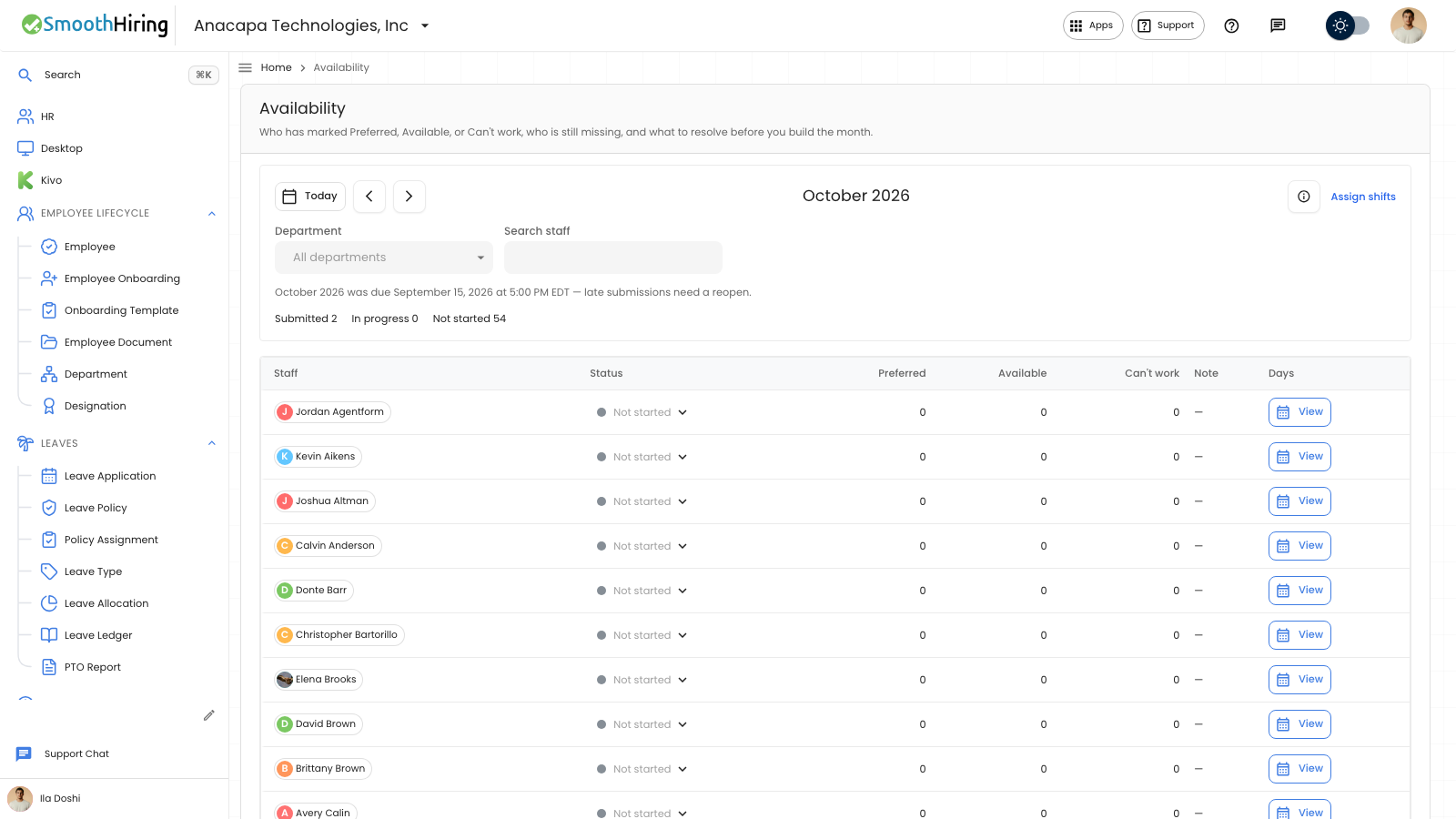
A scheduler reviews the month on Availability under Shift & Attendance. The page lists who has marked Preferred, Available, or Can't work, who is still missing, and what to resolve before you build the month. Publishing a schedule does not create pay.
- Open Availability.
- Use Today, Previous period, and Next period for the month.
- Optional: set Department. The placeholder is All departments. Optional: use Search staff.
- Read the counts for Submitted, In progress, and Not started.
- On a person’s row, choose View to open their days. Choose Close when you are done.
- Choose Assign shifts when you are ready to put people on days.
The columns are Staff, Status, Preferred, Available, Can't work, Note, and Days.
What you should see
Each row shows that person’s counts and note. View opens a calendar for the month you are on. Days on that calendar cannot be edited from here.
An empty month says No staff in this month, and Add people, then they can mark their days from the employee portal.
The due line appears when a deadline is set. After it has passed, the line adds: late submissions need a reopen.
If something looks wrong
Status Submitted can be set to Reopened so that person can update the month. See When a month is locked. In progress, Not started, and Reopened do not offer Reopen.
Search and department only filter the list. They do not change anyone’s days.
Staff mark days in the employee portal. This page is the review. See My availability.