




The simplest way to automate hiring process tasks on a small team is to start with the repetitive work that carries the least risk: collecting applications, posting jobs and sending candidate updates. Add interview scheduling, reminders, feedback requests and reporting next. Keep rejection and hiring decisions with a person, and let software handle the messages and records around them.
This guide shows how to find the tasks worth automating, a five-factor score for ranking them, a table with a suggested order, a 30-day checklist, common mistakes and a way to measure results against your own baseline. It is written for small businesses and recruiting teams of 10 or fewer, where one person often posts the job, answers every candidate and books every interview.
Key takeaways
Automate tasks that repeat, follow fixed rules and produce a message, a record or a calendar entry.
Score each task on frequency, time spent, business impact, effort and risk, and start with the highest scores.
Keep rejection decisions, final hiring decisions and sensitive candidate conversations with a person.
Measure results against your own baseline, not against benchmarks from other companies.
What does it mean to automate hiring process tasks?
To automate hiring process tasks means setting up software to carry out a repeatable recruiting step, such as posting a job, sending a stage update or booking an interview slot, according to rules you define. A person still sets the rules, writes the messages and makes the decisions. This guide covers rule-based automation and templates. It leaves out AI tools that rank or score candidates, which carry different risks and are covered in our guide to AI in recruitment.
How to find repetitive, high-volume recruiting tasks
Track your own week for two weeks. A simple log is enough: write down each recruiting task, how often it happens, how long it takes, who does it and what tends to go wrong. Your sent-email folder and calendar will show most of it. A task is a good candidate for automation when it:
- Repeats with the same steps each time
- Starts from a clear trigger, such as an application arriving or a candidate changing stage
- Produces a message, a record or a calendar entry instead of a judgment
- Has mistakes that are easy to spot and fix
Two quick tests help. Do you paste the same text more than twice a week? Do candidates keep asking you the same question? Both point to something worth automating.
A prioritization framework: score each task on five factors
Score every task from 1 to 5 on the factors below. For the first three, a higher score is a reason to automate sooner. For effort and risk, a higher score is a reason to wait.
| Factor | Question to ask |
|---|---|
| Frequency | How often does this task come up each week? |
| Time spent | How many minutes does it take across a typical role? |
| Business impact | Does it affect candidate experience, speed or the quality of the process? |
| Implementation effort | How hard is setup, including writing templates and testing? |
| Risk | What happens if it goes wrong, and could it affect a candidate’s chance of being hired? |
Priority score = frequency + time spent + business impact − effort − risk. A higher score means do it sooner. Break ties by choosing the lower-effort task, then the one other tasks depend on. One rule overrides the math: any task with a risk score of 5 keeps a person in the decision, whatever its total.
| Task | Freq. | Time | Impact | Effort | Risk | Score | Order |
|---|---|---|---|---|---|---|---|
| Application collection | 5 | 4 | 4 | 2 | 1 | 10 | 1 |
| Job posting and distribution | 4 | 4 | 4 | 2 | 1 | 9 | 2 |
| Interview scheduling | 4 | 5 | 4 | 3 | 1 | 9 | 3 |
| Candidate status updates | 5 | 3 | 4 | 2 | 2 | 8 | 4 |
| Reminders | 4 | 2 | 3 | 1 | 1 | 7 | 5 |
| Feedback collection | 3 | 3 | 3 | 3 | 2 | 4 | 6 |
| Reporting | 2 | 3 | 3 | 3 | 1 | 4 | 7 |
| Rejection decisions | 5 | 3 | 5 | 3 | 5 | 5 | Person decides |
What to automate first: the prioritized table
The table applies those scores to the full workflow and shows the human oversight each step needs. The benefits listed are operational. They describe what the work looks like afterward, not a guaranteed time saving.
| Task | Automation opportunity | Expected operational benefit | Human oversight required | Order |
|---|---|---|---|---|
| Application collection | Route every application from every source into one candidate record and send an acknowledgement | One place to look, fewer lost or duplicate applications | Spot-check duplicates and review the application form questions | 1 |
| Job posting and distribution | Write once, publish to several boards and your careers page, reuse templates for repeat roles | Less retyping and consistent job details | Approve each ad before it goes live and review which boards bring qualified applicants | 2 |
| Interview scheduling | Candidates pick a slot from interviewers’ live calendars | Fewer email threads about times | Confirm the stage and panel, and handle exceptions | 3 |
| Candidate status updates | Stage-based messages: received, in review, interview, update on next steps | Candidates are not left guessing, and fewer “any news?” emails arrive | Write and approve every template and check the tone | 4 |
| Reminders | Automatic reminders to candidates and interviewers | Fewer missed or forgotten interviews, as your own data will show | Review the wording and handle reschedules | 5 |
| Feedback collection | Scorecard requests and nudges after each interview | Consistent input in one place | Interviewers write the evaluation and the hiring manager reads it | 6 |
| Reporting | On-demand pipeline, source and time reports | Less manual spreadsheet work | A person interprets the numbers and decides what to change | 7 |
| Rejection decisions | Automate only the message after a person decides. Use rules to sort or flag, never to decide. | Faster, more respectful closing of the loop | A recruiter makes and reviews every rejection, including any rule-based list | Message only, after step 4 |
| Final hiring decision | None. Software can gather scorecards and references into one view. | A clearer record for the decision | The hiring manager and recruiter decide and own the outcome | Never |
| Offer and onboarding handoff | E-documents, task lists and reminders after acceptance | Fewer paper chases | Review offer terms before they are sent | After day 30 |
The first seven steps in practice
1. Application collection. Get every application into one candidate record, whether it arrives from a job board, your careers page or a referral. Add a short acknowledgement so applicants know it landed. Check the application form too, since a long one can cost you applicants before you ever see them.
2. Job posting and distribution. Publish each job from one place and keep a template for roles you repeat. If you post to several boards, multi job posting software or job distribution software removes the retyping. Check each ad before it goes live, because software repeats a weak ad as faithfully as a good one.
3. Interview scheduling. Sync interviewers’ calendars, offer open slots and let candidates choose one. Email threads over times are a common time sink for small teams. Keep a person on exceptions such as panel changes, accessibility needs and reschedules.
4. Candidate status updates. Write one short message per stage and send it when a candidate enters that stage. Name a real sender, say what happens next and promise only timelines you can keep. The “not selected” message goes out only after a person has made that call.
5. Reminders. Remind candidates and interviewers before each interview, with the time, time zone, format and a way to reschedule. If you text candidates, get their consent first and check the rules that apply to you.
6. Feedback collection. Request a scorecard from each interviewer soon after the interview, using one template per role so feedback is comparable. An automatic nudge beats chasing people in the hallway.
7. Reporting. Start with a short weekly view of applications, stage movement and time in stage. Reporting comes last because it depends on the data the earlier steps produce.
Tasks that should keep human review
Automation should save time on the work around a decision. It should not make the decision.
Rejection decisions. A recruiter or hiring manager decides who moves forward, and software can send the message afterward. Rules that sort or flag applicants, such as a minimum years-of-experience filter, should use job-related criteria only, and someone should review the list before anyone is removed.
Final hiring decisions. The hiring manager and recruiter decide and own the outcome. Automation can pull scorecards and references into one view.
Offer terms. A person checks pay, start date and conditions before an offer goes out.
Accommodation requests and unusual questions. Route them to a named person instead of a template.
Check the rules where you hire. Requirements for automated screening differ by location and are changing. New York City requires a bias audit and notice to candidates for certain automated employment decision tools. Ontario requires employers with 25 or more employees to say in a public job posting when AI is used to screen, assess or select applicants. Federal guidance on employee selection procedures in the US is also being revised in 2026. The EEOC’s recordkeeping summary says private employers must keep application and personnel records for one year. This article is general information, not legal advice. Ask an employment lawyer what applies to you.
How an ATS and automation cut admin work without losing the personal touch
An applicant tracking system (ATS) gives automation something to work on: one record per candidate, defined stages and a clear event, such as a stage change, that can trigger a message or a task. Without that structure, automation ends up scattered across inboxes and spreadsheets.
Candidate experience holds up when people write the messages, the timing is honest and a real person is reachable. Read each template as if you were the applicant, and run a test candidate through the whole flow before you switch it on.
Accountability holds up when every automation has a named owner, every decision has a named decision-maker and the system keeps a record. Look for an ATS that logs who moved a candidate and when. SmoothHiring’s help center describes an activity log that records stage changes, ratings, comments and rejection emails with the person and a timestamp.
You do not need a stack of tools. A small team can start with an ATS that covers posting, application collection, stage messages and scheduling, plus a shared calendar and a spreadsheet for baseline numbers. If you already have an ATS, switch on its built-in features before buying anything. Our guide to ATS features small businesses need covers what is worth paying for.
A 30-day implementation checklist
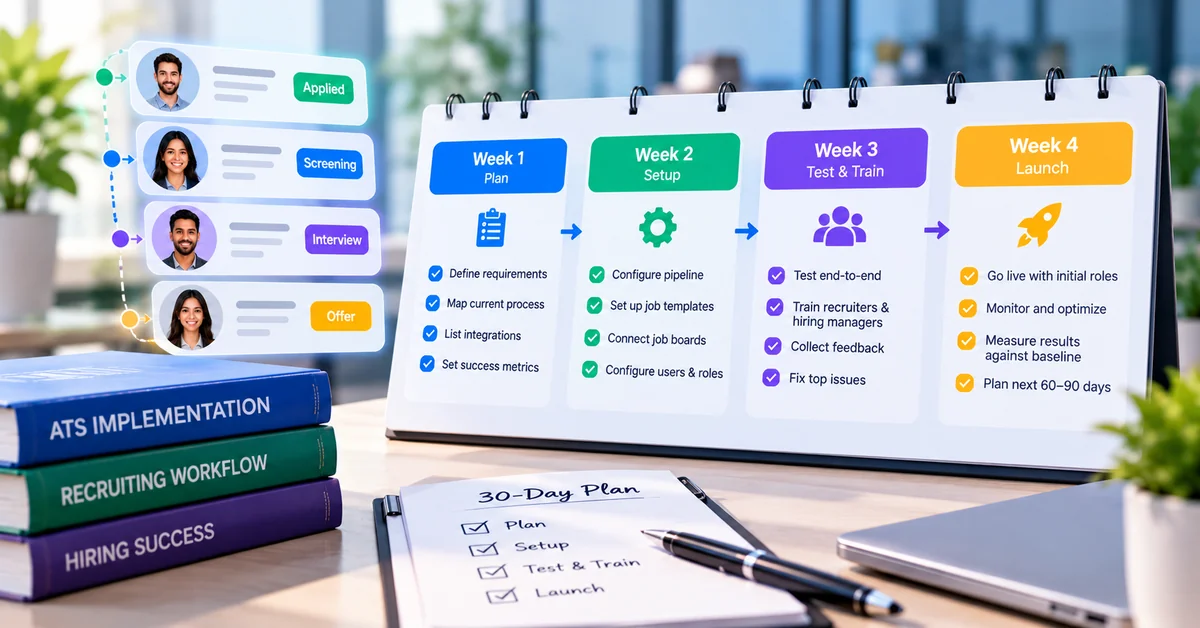
Work through the weeks in order, because each builds on the last. Treat the pacing as a guide. If your hiring is seasonal or you have few open roles, slow down.
Week 1 (days 1 to 7): baseline and map
- List every recruiting task from your last three roles, using sent email and calendar entries.
- Log the time each task takes for one week. A spreadsheet is enough.
- Score the tasks with the five-factor method.
- Write down your real hiring stages and who owns each one.
- Record baseline numbers: applications per role, days to first response, days from application to first interview and days to fill.
Week 2 (days 8 to 14): application collection and job posting
- Set up pipeline stages that match your real process.
- Build a job template for your most frequent role and a standard application form.
- Route all applications into one candidate record.
- Post one live role through the new flow and check how it appears on each channel.
- Add an acknowledgement message and read it as a candidate would.
Week 3 (days 15 to 21): scheduling, status updates and reminders
- Connect interviewers’ calendars and set their availability.
- Turn on self-scheduling for one role.
- Write a message for each stage, including “not selected,” which sends only after a person moves the candidate.
- Add reminders for candidates and interviewers.
- Test the full flow with a dummy candidate, on a phone as well as a laptop.
Week 4 (days 22 to 30): feedback, reporting and review
- Create a scorecard template and request a scorecard after every interview.
- Pick four or five metrics and schedule a weekly look.
- Compare against your week 1 baseline and hold a 30-minute review: what saved time, and what annoyed candidates?
- Name an owner and a review date for each automation.
- Decide what comes next, such as the offer and onboarding handoff.
Common automation mistakes and how to avoid them
Mistake What goes wrong How to avoid it Automating a broken process The mess gets faster Map your stages and fix the steps first Automating decisions instead of tasks People are screened out with no human review Automate the message and the record. Keep the decision with a person. Turning everything on at once Nobody can tell what broke or helped Add one step at a time, starting with one role Robotic or vague templates Candidates feel processed and reply with questions Write like a person, name a sender and state the next step Skipping the baseline You cannot show what changed Record your own numbers in week 1 Not testing candidate-facing messages Broken merge fields, wrong times, tone problems Send a dummy candidate through the full flow first No named owner Templates go stale and no one notices Assign an owner and a monthly review date for each automation
How to measure the impact without inventing benchmarks
Week 2 (days 8 to 14): application collection and job posting
- Set up pipeline stages that match your real process.
- Build a job template for your most frequent role and a standard application form.
- Route all applications into one candidate record.
- Post one live role through the new flow and check how it appears on each channel.
- Add an acknowledgement message and read it as a candidate would.
Week 3 (days 15 to 21): scheduling, status updates and reminders
- Connect interviewers’ calendars and set their availability.
- Turn on self-scheduling for one role.
- Write a message for each stage, including “not selected,” which sends only after a person moves the candidate.
- Add reminders for candidates and interviewers.
- Test the full flow with a dummy candidate, on a phone as well as a laptop.
Week 4 (days 22 to 30): feedback, reporting and review
- Create a scorecard template and request a scorecard after every interview.
- Pick four or five metrics and schedule a weekly look.
- Compare against your week 1 baseline and hold a 30-minute review: what saved time, and what annoyed candidates?
- Name an owner and a review date for each automation.
- Decide what comes next, such as the offer and onboarding handoff.
Common automation mistakes and how to avoid them
Mistake What goes wrong How to avoid it Automating a broken process The mess gets faster Map your stages and fix the steps first Automating decisions instead of tasks People are screened out with no human review Automate the message and the record. Keep the decision with a person. Turning everything on at once Nobody can tell what broke or helped Add one step at a time, starting with one role Robotic or vague templates Candidates feel processed and reply with questions Write like a person, name a sender and state the next step Skipping the baseline You cannot show what changed Record your own numbers in week 1 Not testing candidate-facing messages Broken merge fields, wrong times, tone problems Send a dummy candidate through the full flow first No named owner Templates go stale and no one notices Assign an owner and a monthly review date for each automation
How to measure the impact without inventing benchmarks
Week 4 (days 22 to 30): feedback, reporting and review
- Create a scorecard template and request a scorecard after every interview.
- Pick four or five metrics and schedule a weekly look.
- Compare against your week 1 baseline and hold a 30-minute review: what saved time, and what annoyed candidates?
- Name an owner and a review date for each automation.
- Decide what comes next, such as the offer and onboarding handoff.
Common automation mistakes and how to avoid them
Mistake What goes wrong How to avoid it Automating a broken process The mess gets faster Map your stages and fix the steps first Automating decisions instead of tasks People are screened out with no human review Automate the message and the record. Keep the decision with a person. Turning everything on at once Nobody can tell what broke or helped Add one step at a time, starting with one role Robotic or vague templates Candidates feel processed and reply with questions Write like a person, name a sender and state the next step Skipping the baseline You cannot show what changed Record your own numbers in week 1 Not testing candidate-facing messages Broken merge fields, wrong times, tone problems Send a dummy candidate through the full flow first No named owner Templates go stale and no one notices Assign an owner and a monthly review date for each automation
How to measure the impact without inventing benchmarks
| Mistake | What goes wrong | How to avoid it |
|---|---|---|
| Automating a broken process | The mess gets faster | Map your stages and fix the steps first |
| Automating decisions instead of tasks | People are screened out with no human review | Automate the message and the record. Keep the decision with a person. |
| Turning everything on at once | Nobody can tell what broke or helped | Add one step at a time, starting with one role |
| Robotic or vague templates | Candidates feel processed and reply with questions | Write like a person, name a sender and state the next step |
| Skipping the baseline | You cannot show what changed | Record your own numbers in week 1 |
| Not testing candidate-facing messages | Broken merge fields, wrong times, tone problems | Send a dummy candidate through the full flow first |
| No named owner | Templates go stale and no one notices | Assign an owner and a monthly review date for each automation |
How to measure the impact without inventing benchmarks
Compare against your own numbers from week 1. Industry averages come from companies with different roles, volumes and tools, so they say little about your team. Measure the same things before and after, for the same kind of role.
| Metric | What it shows | Where to get it |
|---|---|---|
| Admin time per hire | Hours spent on posting, scheduling and messaging for one hire | Your weekly time log, kept in week 1 and again in week 4 |
| Time to first response | Days from application to first message | ATS timestamps or a sample of recent applicants |
| Time to schedule | Days from “advance to interview” to a booked slot, and emails exchanged | Interview records, calendar and inbox sample |
| No-shows and reschedules | Whether reminders are helping | A monthly count from interview records |
| Feedback turnaround | Days from interview to submitted scorecard | Scorecard timestamps |
| Stage conversion and time in stage | Where candidates stall | Your ATS pipeline or analytics view |
| Candidate experience | How applicants felt about communication | A two-question survey after the process, plus hiring manager comments |
Small teams make few hires, so one role can swing any percentage. Report counts and days, look at individual roles and treat early numbers as signals rather than proof. Watch for harm too. If candidates start asking for updates more often or hiring managers complain about missing feedback, change the automation.
How SmoothHiring supports these steps
SmoothHiring is one ATS that covers several of these steps. The table lists what its product pages and help center describe. Plans and bundles vary, so confirm what your account includes.
| Step | What the pages describe | Confirm before relying on it |
|---|---|---|
| Job posting and distribution | Job distribution software publishes a job to a network of job boards and social channels from one posting, with sponsored options on some boards. Job templates and a copy-job option cover repeat roles. | Board counts differ between pages. Ask which boards your plan includes. |
| Application collection and status updates | The applicant tracking system keeps applicants in a central candidate database with customizable stages. Stage actions can send an email, an assessment invitation or a scorecard request when a candidate enters a stage, and each can be switched on or off. | Text messages are listed as coming soon. |
| Interview scheduling and reminders | Interview scheduling syncs Google and Outlook calendars and lets candidates pick a slot. Automated email reminders go out before interviews. | The help article says reminder timing is set by the system and is not configurable. |
| Feedback collection | Scorecard templates, a deadline on each request and automatic reminders to interviewers with pending scorecards. | Confirm that the templates fit your roles. |
| Reporting | Analytics by job, stage and time range, with time to hire by stage, a conversion funnel and CSV export. | The analytics help article does not describe source of hire. Confirm if you need it. |
| Onboarding | Onboarding covers e-offer letters, e-signatures, onboarding tasks with reminders and templates by role, location or department. | Confirm how candidate data carries over from the ATS. |
On rejections, the help center describes rejection email templates that can be attached to the Rejected stage, so the message goes out when a person moves the candidate. It also describes a batch rejection tool that runs only when a user starts it, with a preview of the affected applicants and a confirmation step. Use both the way this guide suggests: a person decides and the system sends. For the wider product view, see recruiting automation software. None of this guarantees a faster hire or better candidates. Results depend on your process, your job ads and how consistently the team uses the tools.
Frequently asked questions
What should small teams automate first in recruiting?
What should small teams automate first in recruiting?
Start with application collection and job posting, then interview scheduling, candidate status updates and reminders. These tasks repeat often, follow fixed rules and carry little risk. Add feedback collection and reporting once the first steps run reliably. Leave rejection decisions and final hiring decisions with a person.
How can I automate hiring process tasks without a big budget?
Use one ATS that covers posting, application collection, stage messages and scheduling instead of a separate tool for each step. Add a shared calendar and a spreadsheet for baseline numbers. If you already have an ATS, switch on its built-in features first. Check what your plan includes before buying anything.
Which recruiting tasks should not be automated?
Rejection decisions, final hiring decisions and offer terms should stay with a person. So should accommodation requests and questions that do not fit a template. Software can send the message after a decision, gather scorecards and keep records, but a named recruiter or hiring manager should own each decision.
Can an ATS automate interview scheduling and candidate updates?
Many can. Common features include calendar sync, candidate self-scheduling, automated reminders and emails triggered when a candidate changes stage. Features vary by product, so check how reminders are timed, whether text messages are supported and whether you can edit every template before you rely on them.
How do I measure whether recruiting automation is working?
Record a baseline first, then compare the same measures after setup: admin time per hire, time to first response, time to schedule, feedback turnaround and no-shows. Add a short candidate survey. Use your own numbers instead of outside benchmarks, and read results role by role when you make few hires.
How long does it take to set up recruiting automation?
It depends on your ATS, the number of open roles and how many templates you need to write. A small team can work through the first steps in about 30 days using the checklist above, one phase per week. Treat that as a pacing guide, not a promise.
Conclusion
To automate hiring process tasks on a small team, start with one week of tracking, because the log shows where your own hours go. Then work in order: applications and job posts, scheduling, status messages and reminders, then feedback and reports. Keep the people who make decisions in the loop, write every template as if you were the candidate, and compare results with your baseline after 30 days.


