Buying recruiting software is easy. The hard part is the first month, when jobs still live in spreadsheets, hiring managers don’t know where to click, and every recruiter works a little differently. A recruiting software implementation with a clear schedule and named owners gives a small team a better chance of ending up with a tool that gets used instead of one that is paid for and half abandoned.
This guide lays out a week-by-week plan for small teams: what to decide, who owns each task, a checklist for each week, the mistakes to avoid and how to tell the rollout worked. It is a general framework, not a description of any one vendor’s implementation service. Ask your vendor what onboarding help comes with your plan and fit it into these four weeks.
Key Takeaways
Timeline: a focused rollout can fit into 30 days for a small team when the scope stays narrow. Larger data migrations and many integrations take longer.
Four phases: week 1 requirements and planning, week 2 configuration and setup, week 3 testing and training, week 4 launch and optimization.
Start small: go live with one or two roles, then widen.
Owners and measures: name one owner per task and agree three success measures before launch.
What a 30-day plan leaves out
A month works when the scope is small: one team, one or two roles to start, and a handful of integrations. Plan separately if you have multiple locations, a large archive of candidate records to migrate, a custom approval chain, or an HR system connection that needs IT work. You can still use the four-week structure, but give each phase more time and treat the first month as a pilot.
Before day one: owner, scope and baseline
Decisions made before the clock starts will save time later.
Choose a project owner. One person with real hours to spend, plus a sponsor who can approve decisions, a hiring-manager representative, and an IT or admin contact if systems need to connect.
Define the scope. Decide what the software replaces (spreadsheets, email, an old system) and which roles go first.
Capture a baseline. Rough figures from your last two or three roles are enough: time to first response, time to schedule interviews, applicants by source, and recruiter hours per hire.
Ask the vendor what is included. Onboarding sessions, help center access, support level and migration help differ by plan.
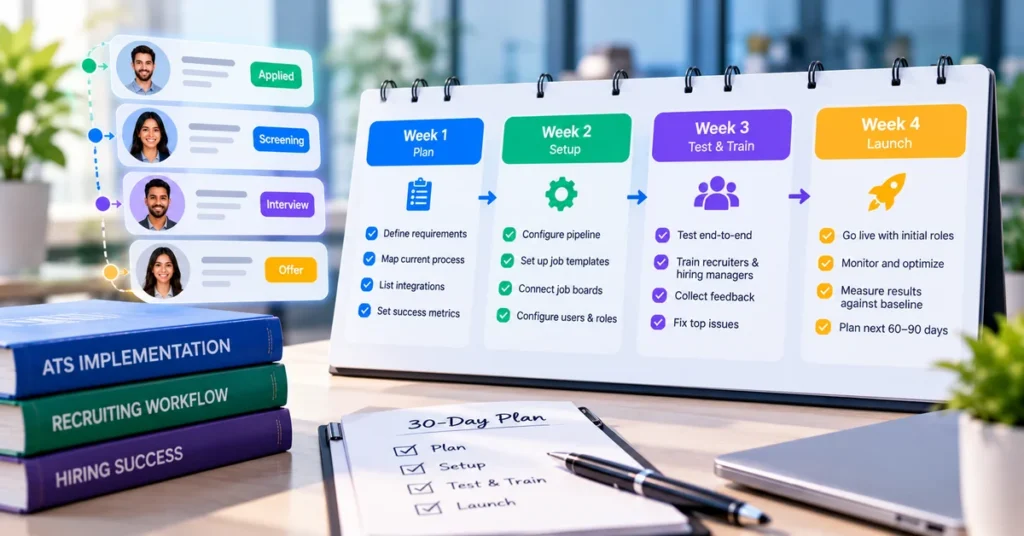
The 30-day plan at a glance
Week Focus Main outputs Lead 1 Requirements and planning Workflow map, role list, data inventory, success measures, launch roles Project owner, sponsor 2 Configuration and setup Pipelines, templates, careers page, integrations, user roles, imported data Project owner, admin or IT 3 Testing and training End-to-end test, fix list, role-based training, go or no-go decision Project owner, recruiters, hiring managers 4 Launch and optimization Live roles, daily check-ins, feedback, first review against the baseline Project owner, sponsor
Week 1: requirements and planning
| Week | Focus | Main outputs | Lead |
|---|---|---|---|
| 1 | Requirements and planning | Workflow map, role list, data inventory, success measures, launch roles | Project owner, sponsor |
| 2 | Configuration and setup | Pipelines, templates, careers page, integrations, user roles, imported data | Project owner, admin or IT |
| 3 | Testing and training | End-to-end test, fix list, role-based training, go or no-go decision | Project owner, recruiters, hiring managers |
| 4 | Launch and optimization | Live roles, daily check-ins, feedback, first review against the baseline | Project owner, sponsor |
Week 1: requirements and planning
The goal this week is a written picture of how hiring should work in the new system. Resist the urge to configure anything yet.
- Map your current steps from job request to signed offer. Our overview of the applicant tracking system lifecycle lists the stages most teams use.
- Write down what you need in the setup: pipeline stages, who approves a new job, required application fields and any knockout questions that reflect real requirements.
- Define user roles: administrator, recruiter, hiring manager and interviewer, and what each one can see.
- Inventory your data: open jobs, active candidates, past candidates worth keeping, job descriptions and email templates. Decide what to import and what to archive.
- Choose the first one or two roles to run in the new system.
- List the integrations you need: calendar, email, job boards and any HR system.
- Set three success measures and write down the baseline for each.
If you are unsure which steps to automate first, read what to automate first in recruiting before you finalize the plan.
Week 2: configuration and setup
Now you build what you designed. Keep the first version simple, because it is easier to add a feature after launch than to remove one.
- Build the pipeline. Name the stages and decide who moves candidates between them.
- Create templates. Job descriptions, acknowledgment emails, interview invitations and rejection messages.
- Set up the careers page and application form. Keep the form short. Ask only for what you use.
- Connect calendar and email, then set up posting to the job boards you actually use. If you advertise on many boards, see our overview of job distribution software.
- Configure users and permissions. Check that hiring managers see only what they need.
- Import data in stages. Clean duplicates and fix column mapping first, import a small batch, check it, then import the rest.
- Set up scorecards and interview structure. The structured interviews guide shows how to keep feedback consistent.
- Decide on AI settings. If your platform includes AI screening, matching or automation, such as the AI screening, matching and automation tools on SmoothHiring’s AI page, choose which features start on and which wait until week 4. Keep a person in the review loop for any ranking.
Week 3: testing and training
Test the whole journey before real candidates see it. Then train people in short sessions built around the tasks they will actually do.
Test the process
- Create a test job and apply as a candidate on both a phone and a computer.
- Move the test candidate through every stage, schedule an interview, send each email template and check that notifications arrive.
- Check a sample of imported records against the originals for errors.
- Confirm that job board posting and calendar sync work with a draft job.
- Log every issue in a shared list and mark each one “blocks launch” or “fix later.”
- If AI features are on, run them alongside your normal screening first. Recruiters shortlist before looking at the tool’s ranking, then compare the two. Our guide to AI in recruitment for small teams explains how.
Train by role
- Recruiters: a working session of 30 to 45 minutes on their daily tasks: posting, reviewing, messaging, scheduling.
- Hiring managers: a shorter session on three things only: review candidates, leave scorecard feedback, and move or decline.
- Everyone: a one-page quick guide and a named person to ask.
Go or no-go checklist
- The test job ran end to end without blocking errors.
- Imported data matches the source in your sample.
- Every user has the right role and access.
- Templates have been reviewed for tone and accuracy.
- Recruiters and hiring managers have been trained.
- Every item marked “blocks launch” is closed.
Week 4: launch and optimization
- Go live with one or two roles. Tell the team the date, what changes and where to get help.
- Hold short check-ins. A ten-minute stand-up each day during the first week of live use surfaces problems quickly.
- Collect feedback from recruiters, hiring managers and, where possible, candidates.
- Fix the top issues first, then switch on the next feature, one at a time.
- Retire the old process by a set date. Running two systems for months splits your data and your attention.
- Hold a review at the end of the week. Compare results with your baseline, decide which roles move over next, and set a 60-day and 90-day check.
After day 30, keep the rhythm going. At 60 days, check whether hiring managers are still leaving feedback in the system and whether the next batch of roles has moved over. At 90 days, compare your three success measures with the baseline, clean up settings that grew messy during launch, and decide which additional features are worth switching on.
Who owns what
Task area Owner Backup or support Project plan and timeline Project owner Sponsor Workflow and pipeline design Recruiting lead Hiring managers Data cleanup and import Project owner or admin Vendor support Integrations and access IT or admin Vendor support Training and hiring-manager adoption Recruiting lead Vendor, where included Review of AI use, candidate notices and data retention HR lead, with counsel Vendor documentation Reporting and success measures Project owner Sponsor
Common implementation mistakes
Mistake What goes wrong Better approach Importing messy data Duplicates and wrong fields spread through the new system Clean first and import in stages Configuring every edge case Setup drags on and nobody launches Launch with the common path and add rules later Training recruiters only Hiring managers keep using email and spreadsheets Give managers a short session and a quick guide Launching every open job at once Problems hit all roles together Start with one or two roles Keeping the old process indefinitely Data and attention split between systems Set a retirement date Turning on all automation at once Errors repeat quickly, and nobody can trace the cause Switch features on one by one with human review Skipping the baseline You cannot tell whether anything improved Record the starting numbers in week 1 No owner after launch Settings drift and training lapses Keep the project owner through day 90
How to tell the rollout worked
| Task area | Owner | Backup or support |
|---|---|---|
| Project plan and timeline | Project owner | Sponsor |
| Workflow and pipeline design | Recruiting lead | Hiring managers |
| Data cleanup and import | Project owner or admin | Vendor support |
| Integrations and access | IT or admin | Vendor support |
| Training and hiring-manager adoption | Recruiting lead | Vendor, where included |
| Review of AI use, candidate notices and data retention | HR lead, with counsel | Vendor documentation |
| Reporting and success measures | Project owner | Sponsor |
Common implementation mistakes
| Mistake | What goes wrong | Better approach |
|---|---|---|
| Importing messy data | Duplicates and wrong fields spread through the new system | Clean first and import in stages |
| Configuring every edge case | Setup drags on and nobody launches | Launch with the common path and add rules later |
| Training recruiters only | Hiring managers keep using email and spreadsheets | Give managers a short session and a quick guide |
| Launching every open job at once | Problems hit all roles together | Start with one or two roles |
| Keeping the old process indefinitely | Data and attention split between systems | Set a retirement date |
| Turning on all automation at once | Errors repeat quickly, and nobody can trace the cause | Switch features on one by one with human review |
| Skipping the baseline | You cannot tell whether anything improved | Record the starting numbers in week 1 |
| No owner after launch | Settings drift and training lapses | Keep the project owner through day 90 |
How to tell the rollout worked
Set your targets before launch, using the baseline from week 1. Look for steady movement in the right direction before you chase a big jump.
| Indicator | How to check it | Direction you want |
|---|---|---|
| Adoption | Share of open roles run in the system, and hiring managers submitting feedback there | Up |
| Speed | Time from application to first response, and time to schedule interviews | Down |
| Data quality | Candidates with a recorded source and stage, and the duplicate count | Complete and clean |
| Recruiter time | Hours of admin work per hire | Down |
| Candidate experience | Application completion rate and candidate comments | Up |
| Hiring manager confidence | A two-question pulse survey at day 30 and day 90 | Positive |
Frequently Asked Questions
How long does recruiting software implementation take?
How long does recruiting software implementation take?
It depends on scope, data volume and integrations. For a small team with a narrow scope, a 30-day plan is realistic. A large data migration, many integrations or several locations will stretch it. Ask each vendor for a written timeline for a team of your size.
Who should lead the implementation?
One named project owner who has real time for it, usually a recruiting or HR lead at a small company. Add a sponsor who can make decisions, and keep an IT or admin contact on call if you have integrations.
Do we need to migrate all our old candidate data?
Not always. Import active candidates and recent pipelines, and archive the rest where you can. Check your data retention policy and any privacy obligations before you move personal information, and clean duplicates first.
Should we turn on AI features at launch?
Start with the core workflow and add AI features one at a time, with a person reviewing the output. Compare what the tool suggests with your recruiters’ own shortlists before you rely on it.
What if hiring managers will not use the new system?
Involve them in week 1, keep their tasks to three actions, and show what they get from it, such as less email and a clear view of their candidates. Make the system the only place where feedback counts.
Start with a platform built for small teams
SmoothHiring’s recruiting software brings job posting, applicant tracking, screening and interviews into one place, which keeps the number of moving parts down for a small team. Its pricing page lists standard support on Starter, priority support on Growth and a dedicated success manager on Scale. Ask the team what onboarding help is included with the plan you choose, and use the four weeks above to plan around it.